n <- 50
p <- 100

set.seed(5)
X <- matrix(rnorm(n * p), n, p)
y <- X[, 1:10] %*% rnorm(10) + rnorm(n)25 The adelie package
As mentioned in the previous chapter, there are many different ways one can regularize a regression model: glmnet only fits elastic net models. In this chapter, we present the adelie package which we view as the successor to glmnet. We previously encountered adelie in Chapter 22 as a way to fit elastic net models efficiently in the Python programming language. In this chapter, we describe other models adelie is able to fit (i.e. the group lasso and group elastic net), and provide some sample code for using adelie in R.
25.1 The group lasso
Imagine we are in the supervised learning setting with our input data matrix \(\mathbf{X} \in \mathbb{R}^{n \times p}\) and response vector \(\mathbf{y} \in \mathbb{R}^n\). The lasso model coefficients are the solution to
\[ \min_{\beta_0, \mathbf{\beta}} \quad \frac{1}{2n} \| \mathbf{y} - \beta_0 \mathbf{1} - \mathbf{X\beta} \|_2^2 + \lambda \|\beta \|_1, \]
where \(\lambda \geq 0\) is a tuning parameter. The use of the \(\ell_1\) penalty results in some coefficients being set to zero exactly, meaning that the corresponding feature is not used in the prediction model.
There are applications where the input features come in groups, and we either want the whole group to be included in the model or for the whole group to be excluded from the model. For example:
We have input features which are categorical in nature. As we saw in Section 6.2, we use one-hot encoding to change one categorical variable into several binary variables, each corresponding to one category. In our model we might either want all of these binary variables to be present, or none of them to be present at all.
We have a group of features which are all derived from the same base feature. For example, for a base feature \(x_1\), we might have 3 derived features \(x_1\), \(x_1^2\) and \(x_1^3\) to allow for a more flexible relationship between \(y\) and \(x_1\). Again, if \(x_1\) is included in the model, we want all 3 derived features to be included to allow for maximum flexibility in the resultant model.
Our features may come in groups that have some contextual meaning. For example, in genetics each gene belongs to a particular genetic pathway. If each input feature corresponds to the expression of one gene, we may want all genes from a particular pathway to be included or excluded.
Unfortunately, the lasso does not support this sparsity pattern.
The group lasso (Yuan and Lin (2005)) was proposed to fill this gap. Assume that the \(p\) input features can be partitioned into \(K\) disjoint groups, and let \(\beta^{(k)}\) denote the coefficients corresponding to group \(k\). With this notation, we can rewrite the lasso problem as
\[ \min_{\beta_0, \mathbf{\beta}} \quad \frac{1}{2n} \| \mathbf{y} - \beta_0 \mathbf{1} - \mathbf{X\beta} \|_2^2 + \lambda \sum_{k=1}^K \|\beta^{(k)} \|_1. \]
The group lasso solution solves a very similar problem: it simply replaces the \(\ell_1\) norm in the penalty with an \(\ell_2\) norm:
\[ \min_{\beta_0, \mathbf{\beta}} \quad \frac{1}{2n} \| \mathbf{y} - \beta_0 \mathbf{1} - \mathbf{X\beta} \|_2^2 + \lambda \sum_{k=1}^K \|\beta^{(k)} \|_2. \]
The lasso can be thought of as a special case of the group lasso where each input feature belongs to its own group.
25.1.1 Some intuition
Let’s consider the simple case of 3 input features to get some intuition for how the group lasso works. Assume that the first group consists of two features while the remaining feature is its own group. Considering the bound form of minimization problems, here are the budget constraints that we place on the coefficients of the model under different penalties:
\[ \begin{aligned} \ell_1 \text{ penalty (lasso): \quad}& |\beta_{11}| + |\beta_{12}| + |\beta_2| \leq B, \\ \text{group lasso penalty: \quad}& \| \beta_1 \|_2 + \| \beta_2 \|_2 \leq B, \\ \ell_2 \text{ penalty (lasso): \quad}& \sqrt{\beta_{11}^2 + \beta_{12}^2 + \beta_2^2} \leq B. \\ \end{aligned} \]
The figure below (extracted from Figure 1 of Yuan and Lin (2005)) illustrates these contours for \(B = 1\):
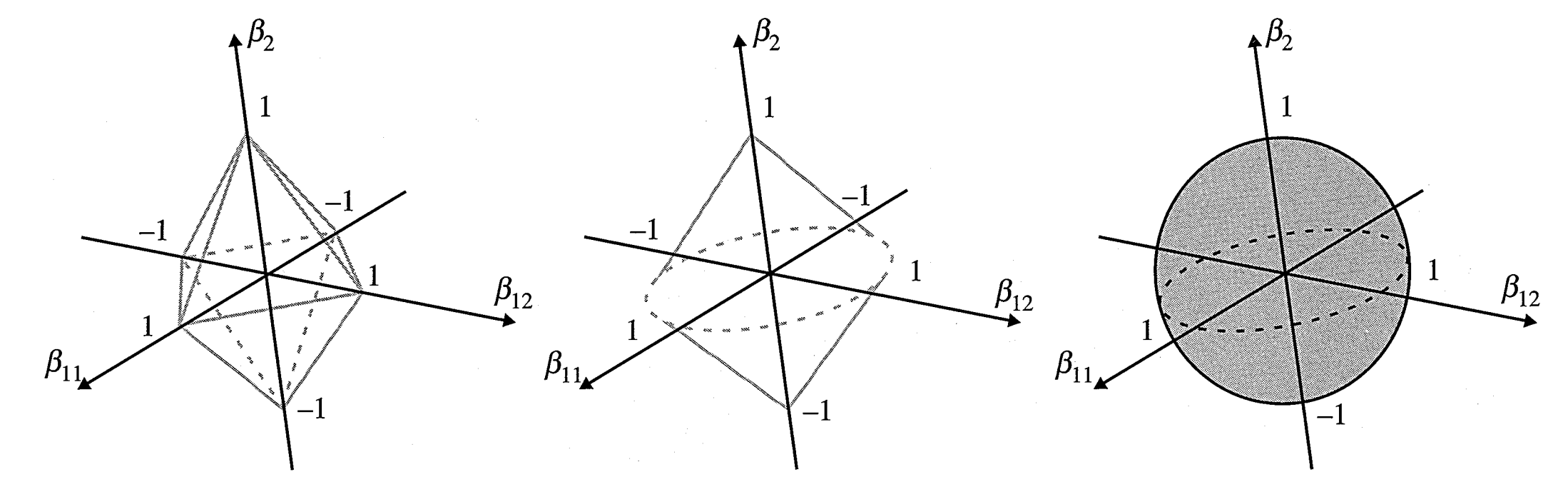
Now, pick a point outside the contour and imagine an ellipsoid growing out from that point until it touches each contour.
For the \(\ell_1\) penalty, there is a non-zero chance that the ellipsoid is touching a vertex of the polytope, which corresponds to two of coefficients being zero, or an edge of the polytope, which corresponds to one of the coefficients being zero.
For the \(\ell_2\) penalty, there is zero chance of the ellipsoid touching any of the points on the sphere which have one of its coordinates being zero.
For the group lasso penalty, there is a non-zero chance of touching the two poles (corresponding to \(\beta_{11} = \beta_{12} = 0\), or the circle corresponding to \(\beta_2 = 0\).
25.2 The group elastic net
Just as the elastic net generalizes the lasso by adding a squared-\(\ell_2\) penalty term, so the group elastic net generalizes the group lasso by adding a squared-\(\ell_2\) penalty term:
\[ \min_{\beta_0, \mathbf{\beta}} \quad \frac{1}{2n} \| \mathbf{y} - \beta_0 \mathbf{1} - \mathbf{X\beta} \|_2^2 + \lambda \sum_{k=1}^K \left[\alpha \|\beta^{(k)} \|_2 + \frac{1-\alpha}{2} \| \beta^{(k)} \|_2^2 \right]. \]
25.3 The adelie package: a crash course
In this section, we show the basic workflow for using the adelie R package to run the group elastic net with cross-validation (CV). (See the R vignette for more of the package’s functionality in R, and see this official user guide for how to use adelie in Python.)
The adelie package is available on CRAN, and so can be installed easily by the entering the command install.packages("adelie") in the console.
Let’s generate some synthetic data to demonstrate adelie on:
The grpnet function fits the group elastic net for a path of \(\lambda\) values (just like glmnet), and the cv.grpnet function runs CV for the \(\lambda\) tuning parameter (just like cv.glmnet). Both grpnet and cv.grpnet take in the input feature matrix via the X argument. The response variable is passed via the glm argument, but cannot be passed as-is: it must be converted to a different object first (more on this shortly).
The code below shows how to run CV for the Gaussian GLM (i.e. family = "gaussian"):
library(adelie)Loaded adelie 1.0.10cvfit <- cv.grpnet(X, glm.gaussian(y))
cvfit
Call:  cv.grpnet(X = X, glm = glm.gaussian(y))

Measure: Mean Deviance

    Lambda Index Measure     SE Nonzero
min 0.1983    46   3.124 0.8149      24
1se 0.4799    27   3.930 1.0344       9
Why do we go through the trouble of passing the response through another function before giving it to cv.grpnet? We do it so that we no longer have to specify a family argument for other models, as well as the weights argument for observation weights. For example, the code below runs CV for logistic regression with the group elastic net and observation weights:
weights <- rep(c(1, 2), length.out = n)
cvbinomfit <- cv.grpnet(X, glm.binomial(y=y, weights=weights))
The adelie package comes equipped with a few commonly used models: at the time of writing these are glm.gaussian(), glm.binomial(), glm.poisson(), glm.multinomial(), glm.cox(), glm.multinomial(), and glm.multigaussian(). See the individual help files for these functions to see what other arguments can be passed to them to define the model.
To define groups for the group elastic net, pass an ordered vector of integers that represents the groupings, with each entry indicating where a group begins, to the groups argument. The length of this vector should be equal to the number of groups. The entries refer to column numbers in the feature matrix, and hence the members of a group have to be contiguous. If feature groups are not defined, each feature is assumed to belong to its own group (default value of 1:p). In that case, the group elastic net is equivalent to the standard elastic net. The code below demonstrates the group elastic net with 10 groups of 10 features each:
groups <- 1 + 10 * 0:9
groups
[1] 1 11 21 31 41 51 61 71 81 91cvgrpfit <- cv.grpnet(X, glm.gaussian(y), groups = groups)adelie.cv_grpnet does 10-fold CV by default; you can change the number of folds via the nfolds argument. Just like cv.glmnet, you can also specify which observations belong to each fold through the foldid argument.
The returned object, of class "cv.grpnet", can be used for plotting, making predictions, and obtaining model coefficients.
The plot method returns a figure of CV error (with error bars) vs. \(-\log (\lambda)\):
plot(cvgrpfit)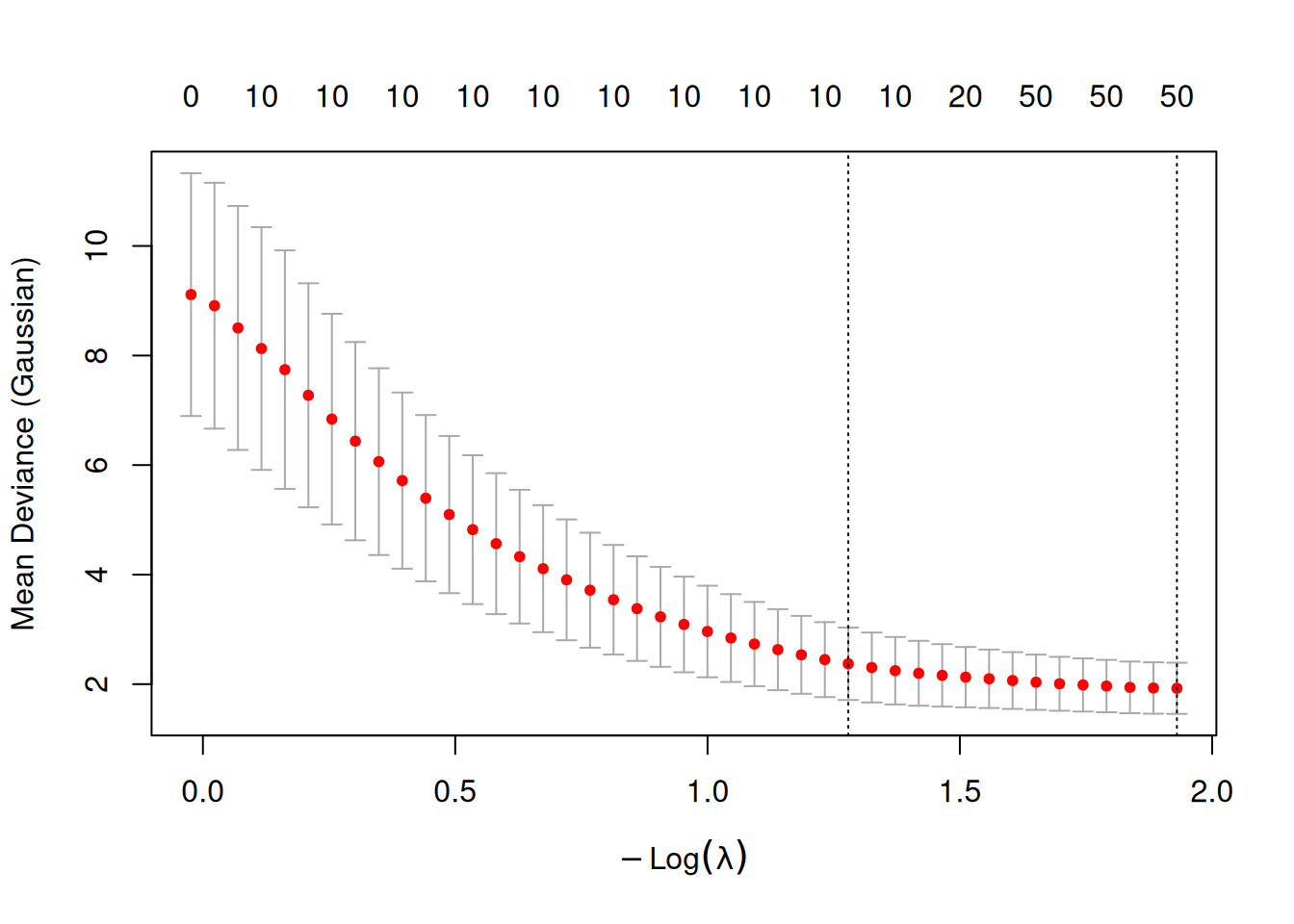
The predict method for class "cv.grpnet" objects works exactly like that for class "cv.glmnet" objects (Section 4.2.3), except that the \(\lambda\) values at which we want predictions is passed through the lambda argument, rather than the s argument. (As with cv.glmnet objects, predictions are given for the "lambda.1se" value by default.)
predict(cvgrpfit, newx = X[1:5, ], lambda = "lambda.min") [,1]
[1,] 1.4603327
[2,] -1.9996572
[3,] -0.7057637
[4,] -1.0764172
[5,] -1.8555907Model coefficients can be obtained through the coef method. Note that coef returns a list instead of a single matrix.
lambda1se_coef <- coef(cvgrpfit)
names(lambda1se_coef)
[1] "intercepts" "betas" "df" "lambda" lambda1se_coef$intercepts
[,1]
[1,] 0.08605631
$betas
1 x 100 sparse Matrix of class "dgRMatrix"
[1,] -0.6273076 0.09916721 -0.729813 -0.7204319 -0.8012881 0.441749 0.293055
[1,] -0.1293917 0.8289589 -0.1936929 . . . . . . . . . . . . . . . . . . . . .
[1,] . . . . . . . . . . . . . . . . . . . . . . . . . . . . . . . . . . . . .
[1,] . . . . . . . . . . . . . . . . . . . . . . . . . . . . . . . .
$df
[1] 10
$lambda
[1] 0.2783415