library(knitr)
library(survival)
kable(head(bladder2))| id | rx | number | size | start | stop | event | enum |
|---|---|---|---|---|---|---|---|
| 1 | 1 | 1 | 3 | 0 | 1 | 0 | 1 |
| 2 | 1 | 2 | 1 | 0 | 4 | 0 | 1 |
| 3 | 1 | 1 | 1 | 0 | 7 | 0 | 1 |
| 4 | 1 | 5 | 1 | 0 | 10 | 0 | 1 |
| 5 | 1 | 4 | 1 | 0 | 6 | 1 | 1 |
| 5 | 1 | 4 | 1 | 6 | 10 | 0 | 2 |
Instead of working with right-censored responses as in the previous chapter, the Cox model can be extended to work with responses which are a pair of times (called the “start time” and “stop time”), with the possibility of the stop time being censored. This is an instantiation of the counting process framework proposed by Andersen and Gill (1982), and the right-censored data set-up is a special case with the start times all being equal to zero.
(start, stop] responses greatly increase the flexibility of the Cox model, allowing for
Time-dependent covariates,
Time-dependent strata,
Left truncation,
Multiple time scales,
Multiple events per subject,
Independent increment, marginal, and conditional models for correlated data, and
Various forms of case-cohort models.
From a dataset viewpoint, going from right-censored data to start-stop data requires just one more variable: the time variable is replaced by (start, stop] variables, with (start, stop] indicating the interval where the unit is at risk. The survival package provides the function tmerge to aid in the creation of such datasets. Study the help page for tmerge and try the examples to see how it can help set up the data.
For this more general setup, inference for the coefficients \(\beta\) in the Cox model can proceed almost exactly as in the case of right-censored data (Chapter 12). The formulas for the partial likelihood and negative log partial likelihood remain the same as before:
\[L(\beta) = \prod_{i=1}^m \dfrac{\exp \left( \mathbf{x}_{j(i)}^\top \beta \right)}{\sum_{j\in R_i} \exp \left( \mathbf{x}_j^\top \beta \right)}.\]
\[-\ell(\beta)=\frac{2}{n} \sum_{i=1}^m \left[ -\mathbf{x}_{j(i)}^\top \beta + \log \left( \sum_{j \in R_i} e^{\mathbf{x}_j^\top \beta} \right) \right].\]
The only thing that changes is the definition of what it means for an observation to be at risk at time \(t_i\). If we let \((y_{1j}, y_{2j}]\) denote the (start, stop] times for observation \(j\), then observation j is at risk at time \(t_i\) if and only if \(t_i \in (y_{1j}, y_{2j}]\).
Let’s illustrate this with an example. Let \(s_j = \exp \left( \mathbf{x}_j^\top \beta \right)\) so that we can write the partial likelihood as
\[L(\beta) = \prod_{i=1}^m \dfrac{ s_{j(i)}}{\sum_{j\in R_i} s_j }.\]
Consider the data below:
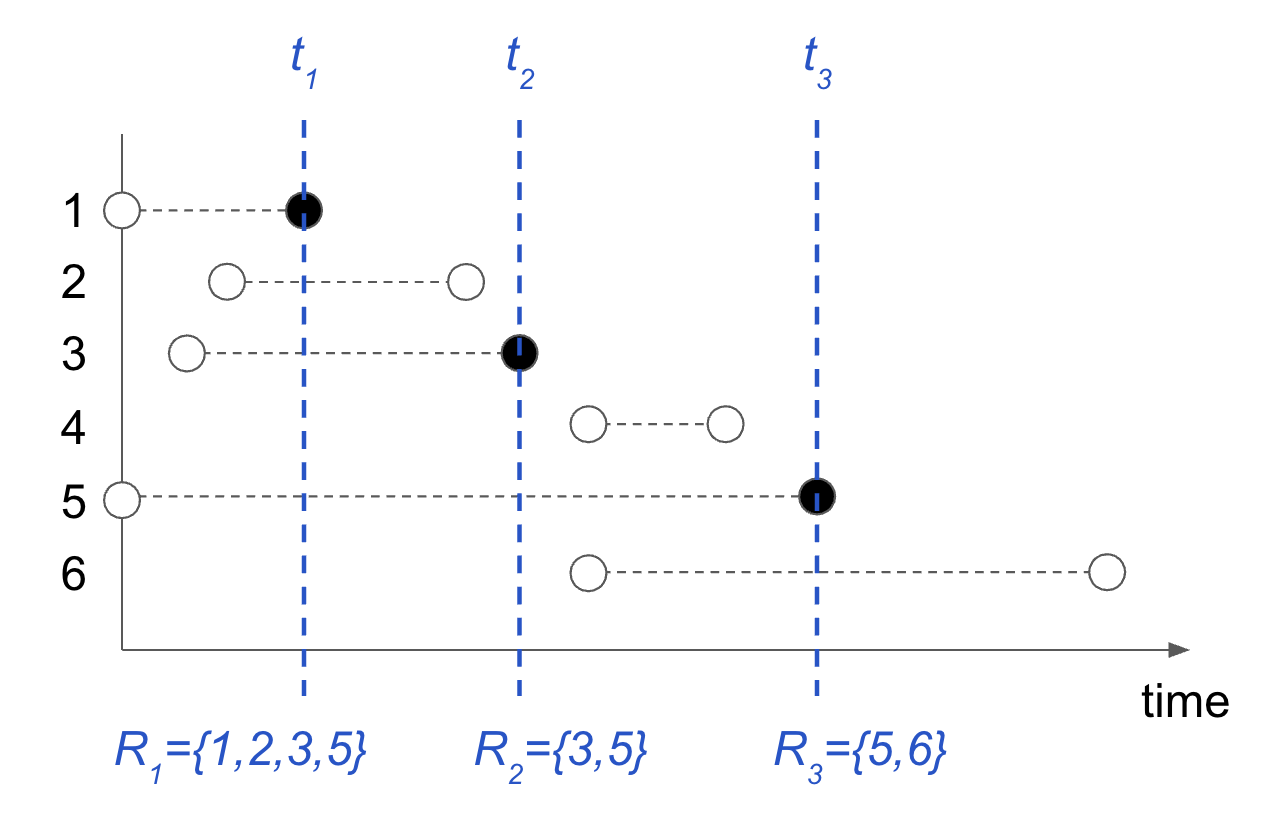
There are 3 unique failure times, and the risk sets associated with each failure time is indicated in the figure. The partial likelihood for this data is
\[L(\beta) = \left( \dfrac{s_1}{s_1 + s_2 + s_3 + s_5} \right) \left( \dfrac{s_3}{s_3 + s_5} \right) \left( \dfrac{s_5}{s_5 + s_6} \right).\]
Fitting the elastic net-regularized version of the Cox model for (start, stop] data is as easy as fitting such a model for right-censored data. In fact, the glmnet function call is exactly the same! The only difference is in the type of Surv object that is passed for the response y. glmnet checks for the Surv object type before routing to the correct internal subroutine.
We illustrate this new functionality on the bladder2 dataset from the survival package. We will fit a regularized Cox model for the time to recurrence based on the treatment type (rx), the initial number of tumors (number) and the size of the largest initial tumor (size).
library(knitr)
library(survival)
kable(head(bladder2))| id | rx | number | size | start | stop | event | enum |
|---|---|---|---|---|---|---|---|
| 1 | 1 | 1 | 3 | 0 | 1 | 0 | 1 |
| 2 | 1 | 2 | 1 | 0 | 4 | 0 | 1 |
| 3 | 1 | 1 | 1 | 0 | 7 | 0 | 1 |
| 4 | 1 | 5 | 1 | 0 | 10 | 0 | 1 |
| 5 | 1 | 4 | 1 | 0 | 6 | 1 | 1 |
| 5 | 1 | 4 | 1 | 6 | 10 | 0 | 2 |
We start by creating the (start, stop] response with survival::Surv:
y <- with(bladder2, Surv(start, stop, event))
head(y)
#> [1] (0, 1+] (0, 4+] (0, 7+] (0,10+] (0, 6]  (6,10+]
The code for fitting the regularized Cox model is then exactly the same as the code we would have used if the response was right-censored:
x <- as.matrix(bladder2[, 2:4])
glmnet(x, y, family = "cox", cox.ties = "breslow")
#>
#> Call:  glmnet(x = x, y = y, family = "cox", cox.ties = "breslow")
#>
#>    Df %Dev   Lambda
#> 1   0 0.00 0.194800
#> 2   1 0.34 0.177500
#> 3   1 0.61 0.161700
#> 4   1 0.83 0.147400
#> 5   1 1.00 0.134300
#> 6   2 1.14 0.122400
....This example illustrates how to fit a Cox model in glmnet using start-stop survival data and a genuinely time-dependent covariate.
We use the heart data from the survival package. The data come from the Stanford heart transplant study. A particularly useful feature of these data is the variable transplant, which changes from 0 to 1 when a patient receives a heart transplant.
library(survival)
data(heart)
dim(heart)
#> [1] 172   8
names(heart)
#> [1] "start"      "stop"       "event"      "age"        "year"
#> [6] "surgery"    "transplant" "id"
With ordinary survival data, each subject typically contributes one row. With time-dependent covariates, however, a subject can contribute several rows. Each row represents an interval \((\mathrm{start},\mathrm{stop}],\) during which the covariates are constant.
For example, suppose a patient receives a transplant at day 50 and dies at day 200. The patient’s data would have the form
| patient | start | stop | event | transplant |
|---|---|---|---|---|
| 1 | 0 | 50 | 0 | 0 |
| 1 | 50 | 200 | 1 | 1 |
The patient is therefore represented by two risk intervals. Before day 50, transplant = 0; after day 50, transplant = 1. The heart data already have this start-stop representation. Lets look at 10 rows of the data:
kable(heart[1:10,
      c("id", "start", "stop", "event",
"age", "surgery", "transplant")])| id | start | stop | event | age | surgery | transplant |
|---|---|---|---|---|---|---|
| 1 | 0 | 50 | 1 | -17.155373 | 0 | 0 |
| 2 | 0 | 6 | 1 | 3.835729 | 0 | 0 |
| 3 | 0 | 1 | 0 | 6.297057 | 0 | 0 |
| 3 | 1 | 16 | 1 | 6.297057 | 0 | 1 |
| 4 | 0 | 36 | 0 | -7.737166 | 0 | 0 |
| 4 | 36 | 39 | 1 | -7.737166 | 0 | 1 |
| 5 | 0 | 18 | 1 | -27.214237 | 0 | 0 |
| 6 | 0 | 3 | 1 | 6.595483 | 0 | 0 |
| 7 | 0 | 51 | 0 | 2.869268 | 0 | 0 |
| 7 | 51 | 675 | 1 | 2.869268 | 0 | 1 |
We see that patients 3, 4 and 7 each have repeated rows. Thus transplant is a genuine time-dependent covariate. The survival package has a function tmerge that can be helpful for creating such a data matrix.
We now construct the response and feature matrix.
y <- with(heart, Surv(start, stop, event))
x <- model.matrix(
  ~ age + surgery + transplant,
  data = heart
)[, -1]
head(x)
#>          age surgery transplant1
#> 1 -17.155373       0           0
#> 2   3.835729       0           0
#> 3   6.297057       0           0
#> 4   6.297057       0           1
#> 5  -7.737166       0           0
#> 6  -7.737166       0           1
The rows of x correspond to risk intervals, not necessarily to different subjects. A subject who contributes two start-stop intervals therefore contributes two rows to x.
We can now fit a penalized Cox proportional hazards model directly with glmnet:
fit <- glmnet(
  x = x,
  y = y,
  cox.ties="efron",
  family = "cox"
)
The coefficient paths can be displayed as a function of the penalty parameter:
plot(fit, xvar = "lambda")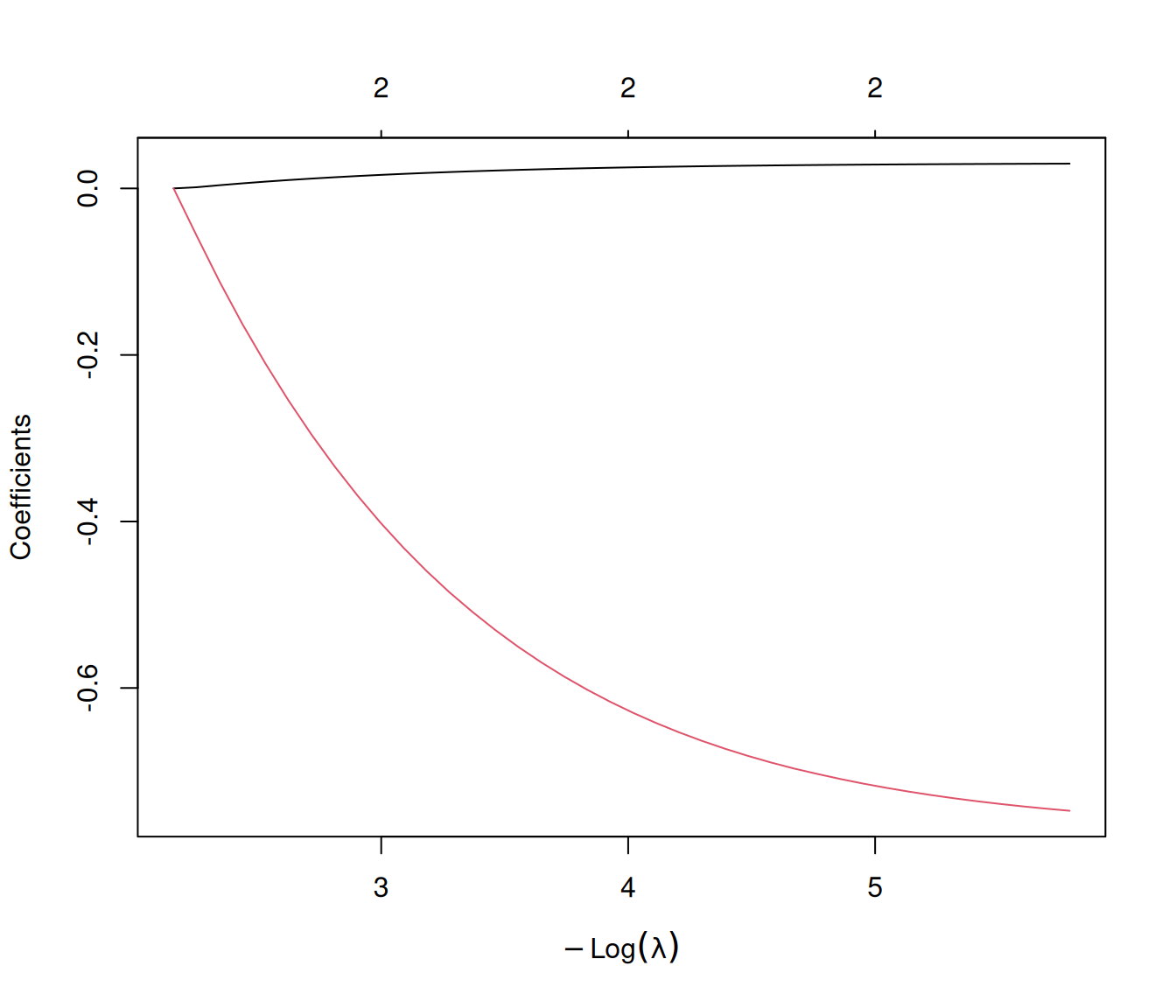
The glmnet regularization path is a bit excessive for such data with only three features. However, we can compute the coefficients at the end of the path (i.e. the unpenalized solution):
coef(fit, s=0, exact = TRUE, x=x, y=y)
#> 3 x 1 sparse Matrix of class "dgCMatrix"
#>                       1
#> age          0.03053634
#> surgery     -0.77332757
#> transplant1  0.01609349
Notice we use exact = TRUE. Without this, the coef.glmnet() method would simply deliver the solution at the smallest value of lambda used in the fit, which is bigger than zero. Here the fit gets updated with this additional value of lambda, and for this reason we have to supply the data x and yas well.
Finally we can compare with the solution produced by coxph. We see that the coefficients match with sufficient accuracy.
fit.coxph <- coxph(
  Surv(start, stop, event) ~ age + surgery + transplant,
  data = heart
)
fit.coxph
#> Call:
#> coxph(formula = Surv(start, stop, event) ~ age + surgery + transplant,
#>     data = heart)
#>
#>                 coef exp(coef) se(coef)      z      p
#> age          0.03054   1.03101  0.01389  2.198 0.0279
#> surgery     -0.77333   0.46147  0.35967 -2.150 0.0315
#> transplant1  0.01610   1.01623  0.30859  0.052 0.9584
#>
#> Likelihood ratio test=10.72  on 3 df, p=0.01335
#> n= 172, number of events= 75
Cross-validation must be done with care for data of this kind. The reason is that individual subjects can occupy more than one row of the data frame. In cases such as this, CV should ensure that subjects are randomized into folds, rather than rows of the data frame.
For this example, we could do the following:
set.seed(1)
id <- heart$id
uid <- unique(id)

K <- 10

subject.fold <- sample(rep(1:K, length.out = length(uid)))
names(subject.fold) <- uid

foldid <- subject.fold[as.character(id)]
This foldid ensures that all rows for each subject are in the same fold.