data("QuickStartExample", package = "glmnet")
x <- QuickStartExample$x
y <- QuickStartExample$y
fitr <- glmnet(x, y, relax = TRUE)
fitr
#>
#> Call:  glmnet(x = x, y = y, relax = TRUE)
#> Relaxed
#>
#>    Df  %Dev %Dev R  Lambda
#> 1   0  0.00   0.00 1.63100
#> 2   2  5.53  58.90 1.48600
#> 3   2 14.59  58.90 1.35400
#> 4   2 22.11  58.90 1.23400
#> 5   2 28.36  58.90 1.12400
#> 6   2 33.54  58.90 1.02400
#> 7   4 39.04  76.56 0.93320
#> 8   5 45.60  80.59 0.85030
#> 9   5 51.54  80.59 0.77470
#> 10  6 57.35  87.99 0.70590
....20 The relaxed lasso
Due to the regularization penalty, the lasso tends to shrink the coefficient vector \(\hat\beta\) toward zero. The relaxed lasso (Meinshausen 2007) was introduced as a way to undo the shrinkage inherent in the lasso estimator. Hastie et al. (2020) proposed a variant of the relaxed lasso and, through extensive simulations, concluded that it performs well in terms of predictive performance across a range of scenarios. It was found to perform just as well as the lasso in low signal-to-noise (SNR) scenarios and nearly as well as best subset selection in high SNR scenarios. It also has a considerable advantage over best subset and forward stepwise regression when the number of variables, \(p\), is large.
20.1 The relaxed lasso for linear regression
The glmnet package has implemented the relaxed lasso1 for all family and alpha arguments. For simplicity, we describe the method for the ordinary least squares (OLS) setting (family = "gaussian") and for the lasso (alpha = 1).
For a given hyperparameter \(\lambda\), let \(\hat{\beta}^{lasso}(\lambda) \in \mathbb{R}^p\) denote the lasso estimator for this value of \(\lambda\). Let \(\mathcal{A}_\lambda\) denote the active set of the lasso estimator, i.e. the indices of the non-zero coefficients of \(\hat\beta^{lasso}(\lambda)\), and let \(\hat\beta_{\mathcal{A}_\lambda}^{LS} \in \mathbb{R}^{|\mathcal{A}_\lambda|}\) denote the OLS coefficients obtained by regressing the response \(y\) on \(X_{\mathcal{A}_\lambda}\) (the subset of the columns of \(X\) which correspond to the features in the active set \(\mathcal{A}_\lambda\))2. Let \(\hat\beta^{LS} \in \mathbb{R}^p\) denote the OLS coefficients \(\hat\beta_{\mathcal{A}_\lambda}^{LS}\) padded with zeros to match the zeros of the lasso solution. The relaxed lasso estimator as proposed by Hastie et al. (2020) is given by
\[ \hat\beta^{relax}(\lambda, \gamma) = \gamma \hat\beta^{lasso}(\lambda) + (1-\gamma) \hat\beta^{LS}(\lambda), \]
where \(\gamma \in [0,1]\) is a hyperparameter, similar to \(\alpha\) in the elastic net. In other words, the relaxed lasso estimator is a convex combination of the lasso estimator and the OLS estimator for the lasso’s active set.
As an example, if \(\hat\beta^{lasso}(\lambda) = \begin{pmatrix} 1 & 0 & 0 & 4\end{pmatrix}^\top\), then \(\mathcal{A}_\lambda = \{ 1, 4\}\) and we would perform OLS of \(y\) on variables 1 and 4. The coefficients from this OLS are denoted by \(\hat\beta_{\mathcal{A}_\lambda}^{LS}\). Let’s say \(\hat\beta_{\mathcal{A}_\lambda}^{LS} = \begin{pmatrix} 2 & 6 \end{pmatrix}^\top\). Then \(\hat\beta^{LS} = \begin{pmatrix} 2 & 0 & 0 & 6 \end{pmatrix}^\top\), and the relaxed lasso estimator is
\[ \hat\beta^{relax}(\lambda, \gamma) = \gamma \begin{pmatrix} 1 \\ 2 \\ 3 \\ 4 \end{pmatrix} + (1-\gamma) \begin{pmatrix} 2 \\ 0 \\ 0 \\ 6 \end{pmatrix}. \]
Notice that variables which were excluded in the lasso remain excluded in the relaxed lasso, while variables which were included in the lasso have their coefficients moving towards the OLS coefficients.
20.2 Fitting the relaxed lasso
You can fit the relaxed lasso with the glmnet function by setting relax = TRUE :
Caution
Make sure that you type the function argument relax correctly! Because glmnet uses ... in its function signature, a mistyped function argument will not throw an error but will be discarded silently. A common mistake we’ve seen users make is to use relaxed = TRUE: glmnet will just ignore this and give you the non-relaxed fit.
The returned object has a predict method which the user can use to make predictions on future data. As an example, the code below returns the relaxed lasso predictions for the training data at \(\lambda=1\) and \(\gamma = 0.5\) (the default value is gamma = 1, i.e., the lasso estimator):
predict(fitr, x, s = 1, gamma = 0.5)
#>                s=1
#>   [1,]  0.07173776
#>   [2,]  2.11579157
#>   [3,]  0.89895772
#>   [4,]  0.99931104
#>   [5,]  0.06338132
#>   [6,]  0.69014055
#>   [7,]  1.07810671
#>   [8,]  0.11789202
#>   [9,]  0.36716836
#>  [10,]  0.61079061
#>  [11,] -2.70767856
#>  [12,]  0.47104949
#>  [13,]  3.56445693
#>  [14,]  0.70701202
....
20.3 Cross-validation for the relaxed lasso
The cv.glmnet function works with the relaxed lasso too. When cross-validating a relaxed lasso model, cv.glmnet provides optimal values for both the lambda and gamma parameters. When selecting the values of \(\gamma\) to include in cross-validation (CV), you can consider as many values as you like. This is because most of the computational time is spent obtaining \(\hat\beta^{lasso}(\lambda)\) and \(\hat\beta^{LS}(\lambda)\); once we have computed them \(\hat\beta^{relax}(\lambda, \gamma)\) is simply a linear combination of the two. By default, cv.glmnet performs CV for gamma = c(0, 0.25, 0.5, 0.75, 1).
As with non-relaxed fits, the output of cv.glmnet has a plot method which plots the CV error against \(\lambda\). Each line corresponds to one value of the gamma hyperparameter.
set.seed(1)
cvfitr <- cv.glmnet(x, y, relax = TRUE)
plot(cvfitr)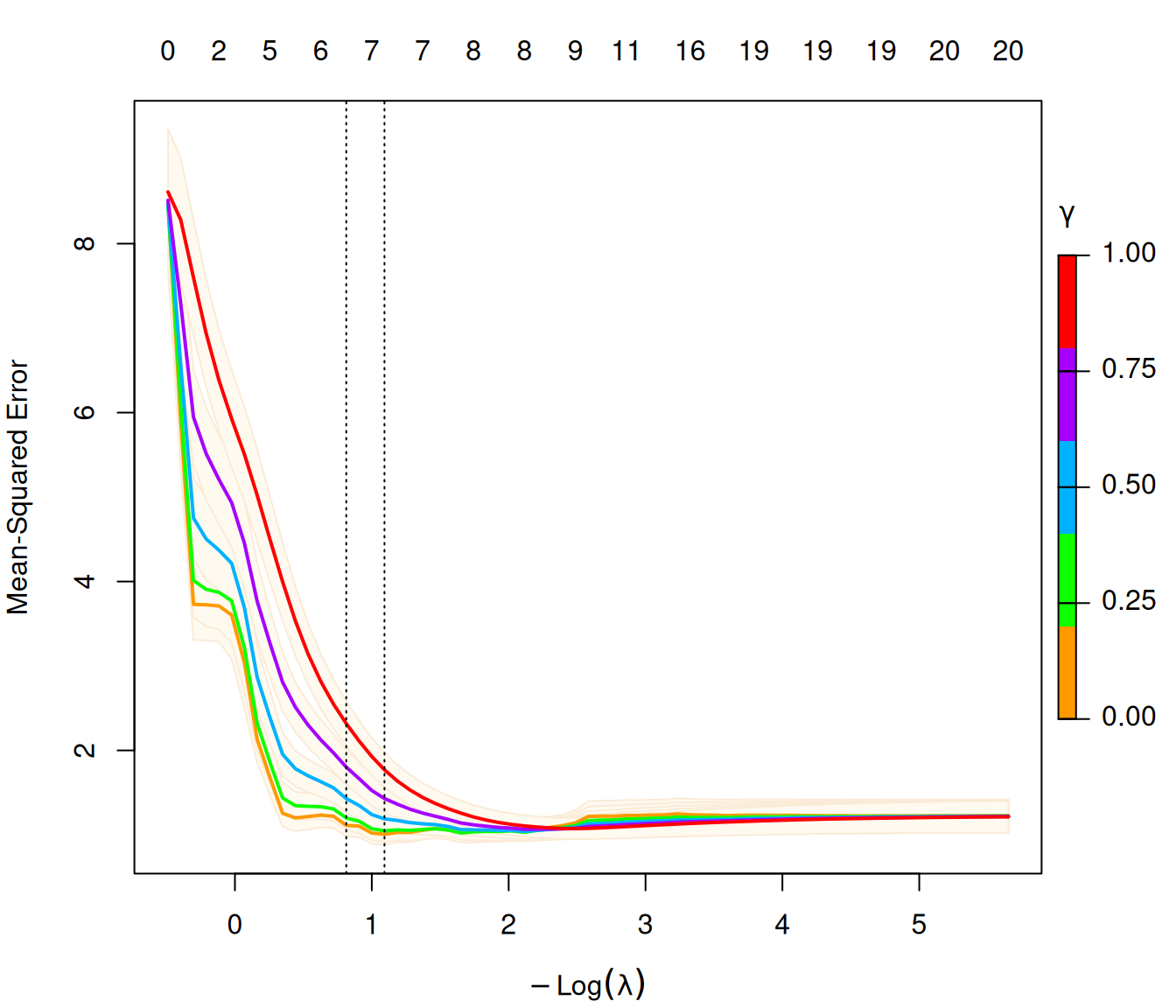
We can make predictions with the returned cv.glmnet object as well.
Just like for non-relaxed models, if we do not specify the \(\lambda\) value with want predictions for with the
sargument,predictwill default tos = "lambda.1se"(see Section 4.2.2 for a discussion onlambda.1sevs.lambda.min).If we do not specify the \(\gamma\) value which we want predictions for,
predictwill default to \(\gamma = 1\), which corresponds to the lasso predictions (no relaxation). We can specify \(\gamma\) via thegammaargument: it can be a fixed number in the interval \([0,1]\), or one of"gamma.min"and"gamma.1se".
# without specifying gamma, defaults to gamma = 1
predict(cvfitr, x, s = "lambda.min")
#>         lambda.min
#>   [1,] -1.62813441
#>   [2,]  2.66983764
#>   [3,]  0.35116222
#>   [4,]  1.91851103
#>   [5,]  1.56643489
#>   [6,] -1.21177646
#>   [7,]  2.86758388
#>   [8,]  0.13511403
#>   [9,]  0.04354716
....

# finding predictions at (lambda, gamma) with minimum CV error
predict(cvfitr, x, s = "lambda.min", gamma = "gamma.min")
#>         lambda.min
#>   [1,] -1.62813441
#>   [2,]  2.66983764
#>   [3,]  0.35116222
#>   [4,]  1.91851103
#>   [5,]  1.56643489
#>   [6,] -1.21177646
#>   [7,]  2.86758388
#>   [8,]  0.13511403
#>   [9,]  0.04354716
....
Note
gamma.min refers to the value of \(\gamma\) in the pair \((\lambda, \gamma)\) corresponding to the model with the smallest CV error. The definition of gamma.1se is a bit trickier. First, look at all \((\lambda, \gamma)\) pairs such that the corresponding model’s CV error is one standard error within the minimum CV error. lambda.1se refers to the largest \(\lambda\) value we see among these pairs; gamma.1se refers to the largest \(\gamma\) value we see among the pairs where the \(\lambda\) value is lambda.1se.
20.4 Application: Forward stepwise regression
One use case for the relaxed fit is to provide a faster version of forward stepwise regression. When the number of variables \(p\) is large, forward stepwise regression can be tedious since it only adds one variable at a time and at each step, it needs to try all predictor variables that are not already included in the model to find the best one to be added. On the other hand, because the lasso solves a convex problem, it can identify good candidate sets of variables over many values of the \(\lambda\) hyperparameter even when \(p\) is in the tens of thousands. In a case like this, one can run cv.glmnet and fit the OLS model for a sequence of selected variable sets.
set.seed(1)
cfitr <- cv.glmnet(x, y, gamma = 0, relax = TRUE)
cfitr
#>
#> Call:  cv.glmnet(x = x, y = y, gamma = 0, relax = TRUE)
#>
#> Measure: Mean-Squared Error
#>
#>     Gamma Index Lambda Index Measure     SE Nonzero
#> min     0     1 0.3354    18   1.007 0.1269       7
#> 1se     0     1 0.4433    15   1.112 0.1298       7
20.5 Additional notes
While the relaxation can be applied for \(\alpha\) values smaller than 1, we do not recommend doing this. Relaxation is typically applied to obtain sparser models. It achieves this by undoing shrinkage of coefficients in the active set toward zero, allowing the model to have more freedom to fit the response. Together with CV on \(\lambda\) and \(\gamma\), this often gives us a model that is sparser than the lasso. Setting \(\alpha < 1\) results in a larger active set than that for the lasso, working against the goal of obtaining a sparser model.