glmnet.measures()
#> $gaussian
#> [1] "mse" "mae"
#>
#> $binomial
#> [1] "deviance" "class"    "auc"      "mse"      "mae"
#>
#> $poisson
#> [1] "deviance" "mse"      "mae"
#>
#> $cox
#> [1] "deviance" "C"
#>
#> $multinomial
#> [1] "deviance" "class"    "mse"      "mae"
#>
#> $mgaussian
#> [1] "mse" "mae"
#>
#> $GLM
#> [1] "deviance" "mse" "mae"15 Assessing models
After fitting regularized regression models with glmnet, we often want to assess their performance on a set of evaluation or test data. After deciding on the performance measure, for each model in the fitted sequence (indexed by the value of \(\lambda\) and possibly \(\gamma\) for relaxed fits, see Chapter 20) we have to build a matrix of predictions and compute the performance measure for it.
15.1 Assessing models with cv.glmnet
cv.glmnet does some of this evaluation automatically. In performing cross-validation (CV), cv.glmnet computes the pre-validated fits (Tibshirani and Efron 2002), that is the model’s predictions of the linear predictor on the held-out folds, and then computes the performance measure with these pre-validated fits. The performance measure is recorded in the cvm element of the returned cv.glmnet and are used to make the CV plot when the plot method is called. When used in this way, one has to pick one of the available performance measures.
glmnet supports a variety of performance measures depending on the model family. The full list of measures can be seen via the call glmnet.measures():
We demonstrate some of this functionality using the spam dataset from the UCI Machine Learning Repository (Mark Hopkins 1999). The spam dataset consists of 4601 emails, classified as either spam or not. The dataset provides 57 input features for each email, which we want to use to predict whether the email is spam.
data_url <- paste0("data/spambase.csv")
df <- read.csv(data_url, header = TRUE)
x <- as.matrix(df[, 1:57])
y <- df[, 58]
The user can change the performance measure computed in CV by specifying the type.measure argument. For example, the code below computes the area under the curve (AUC) of the pre-validated fits instead of the deviance which is the default for family = "binomial":
set.seed(1)
cvfit <- cv.glmnet(x, y, family = "binomial", type.measure = "auc")
print(cvfit)
#>
#> Call:  cv.glmnet(x = x, y = y, type.measure = "auc", family = "binomial")
#>
#> Measure: AUC
#>
#>        Lambda Index Measure       SE Nonzero
#> min 0.0000475    90  0.9726 0.002275      56
#> 1se 0.0028463    46  0.9704 0.002531      52
plot(cvfit)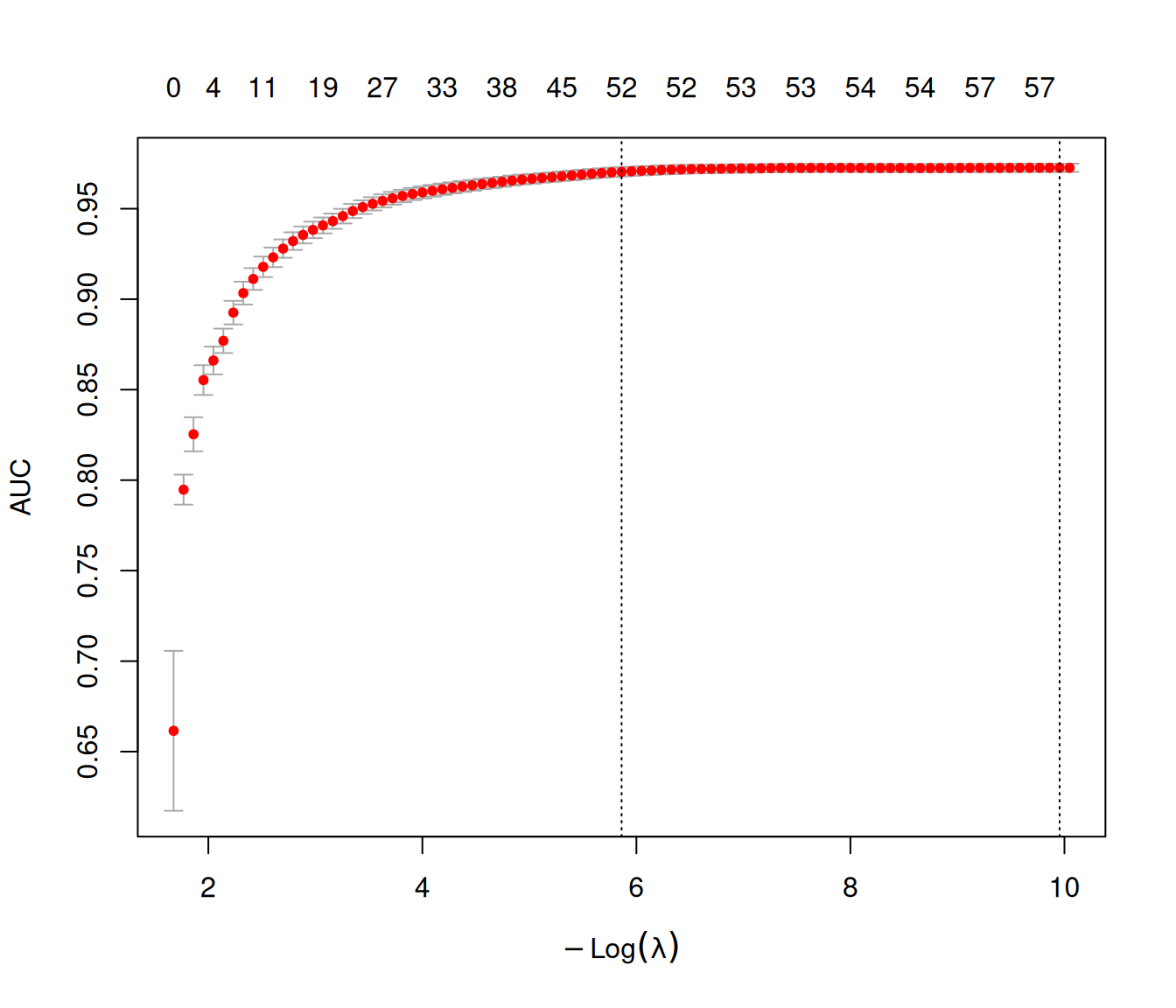
15.2 assess.glmnet
More generally, model assessment can be performed using the assess.glmnet function. The user can pass a class glmnet object, a class cv.glmnet object, or a matrix of predictions to assess.glmnet along with the true response values. The code below shows how one can use assess.glmnet with a class glmnet object. We randomly assign 2/3 of the data as a training set, and the remaining 1/3 as an evaluation set. We train the model on the model matrix x[itrain, ] and response y[itrain], and evaluate the model’s performance on x[-itrain, ] and y[-itrain].
set.seed(1)
itrain <- sample(nrow(x), size = trunc(2 * nrow(x) / 3))
fit <- glmnet(x[itrain, ], y[itrain], family = "binomial")
err <- assess.glmnet(fit, newx = x[-itrain, ], newy = y[-itrain])
names(err)
#> [1] "deviance" "class"    "auc"      "mse"      "mae"
err$deviance
#>        s0        s1        s2        s3        s4        s5        s6
#> 1.3264380 1.3015758 1.2763011 1.2320942 1.1872731 1.1467561 1.1092129
#>        s7        s8        s9       s10       s11       s12       s13
#> 1.0656452 1.0234352 0.9808725 0.9428621 0.9073433 0.8745313 0.8442765
#>       s14       s15       s16       s17       s18       s19       s20
#> 0.8161091 0.7903347 0.7663040 0.7417549 0.7182623 0.6967145 0.6769319
#>       s21       s22       s23       s24       s25       s26       s27
#> 0.6587101 0.6415995 0.6257316 0.6109867 0.5970791 0.5843672 0.5727012
#>       s28       s29       s30       s31       s32       s33       s34
#> 0.5612451 0.5503952 0.5402986 0.5308190 0.5218406 0.5134895 0.5056022
#>       s35       s36       s37       s38       s39       s40       s41
#> 0.4982016 0.4913315 0.4849145 0.4789188 0.4733982 0.4683461 0.4638984
#>       s42       s43       s44       s45       s46       s47       s48
#> 0.4599612 0.4565231 0.4535424 0.4509862 0.4487965 0.4468060 0.4451427
#>       s49       s50       s51       s52       s53       s54       s55
....
By default assess.glmnet will return all possible performance measures for the model family. If a class glmnet object is passed to assess.glmnet, it returns one performance measure value for each model in the \(\lambda\) sequence. The user can get the performance measure values at other values of the \(\lambda\) (and \(\gamma\)) hyperparameters using the s (and gamma) arguments as in the predict method:
assess.glmnet(fit, newx = x[-itrain, ], newy = y[-itrain], s = 0.1)$auc
#> [1] 0.9073383
#> attr(,"measure")
#> [1] "AUC"
If a class cv.glmnet object is passed to assess.glmnet, it returns the performance measure value at the lambda.1se value of the \(\lambda\) hyperparameter. (Again, the user can get the performance measure values at other values of the hyperparameters using the s and gamma arguments.)
set.seed(1)
cfit <- cv.glmnet(x[itrain, ], y[itrain], family = "binomial")
cerr <- assess.glmnet(cfit, newx = x[-itrain, ], newy = y[-itrain])
cerr$auc
#> [1] 0.9730154
#> attr(,"measure")
#> [1] "AUC"
Important
Remember that by default, assess.glmnet returns performance measures at the lambda.1se hyperparameter value, not the lambda.min value unlike many other packages. If you want to compute the performance measure at the \(\lambda\) value with the best (estimated) CV error, remember to pass the s = "lambda.min" option to assess.glmnet.
Finally, the code below shows how to use assess.glmnet with a matrix of predictions. Note that if a matrix of predictions is passed, the user has to specify the model family via the family argument since assess.glmnet cannot infer that from the inputs. (If no family argument is passed, the default value is family = "gaussian", which might not be what you want!)
pred <- predict(fit, newx = x[-itrain, ])
err <- assess.glmnet(pred, newy = y[-itrain], family = "binomial")
err$auc
#>  [1] 0.5000000 0.7801188 0.8125067 0.8492188 0.8762089 0.8830693 0.8955343
#>  [8] 0.9111067 0.9199918 0.9291626 0.9346629 0.9398957 0.9435771 0.9464769
#> [15] 0.9489758 0.9510795 0.9531740 0.9559505 0.9585311 0.9605984 0.9621653
#> [22] 0.9635018 0.9646661 0.9657632 0.9665576 0.9670762 0.9675659 0.9681081
#> [29] 0.9687102 0.9692615 0.9697221 0.9702371 0.9706488 0.9709498 0.9711275
#> [36] 0.9713343 0.9716099 0.9718765 0.9720452 0.9723353 0.9725475 0.9726817
#> [43] 0.9728413 0.9729682 0.9730154 0.9730426 0.9731060 0.9731604 0.9731459
#> [50] 0.9730752 0.9730553 0.9730933 0.9730589 0.9730081 0.9730154 0.9730244
#> [57] 0.9729954 0.9729301 0.9728612 0.9728050 0.9726581 0.9725765 0.9725421
#> [64] 0.9725167 0.9724731 0.9724532 0.9724351 0.9723879 0.9723426 0.9723208
#> [71] 0.9722428 0.9722628 0.9722519 0.9722591 0.9722610 0.9722120 0.9721957
#> [78] 0.9721340 0.9720959 0.9721195 0.9721086 0.9721014 0.9720996 0.9721159
#> [85] 0.9721068 0.9721014 0.9720814 0.9720832 0.9720669 0.9720615
#> attr(,"measure")
#> [1] "AUC"
One major use of assess.glmnet is to avoid running CV multiple times to get the values for different performance measures. By default, cv.glmnet will only return a single performance measure. However, if the user specifies keep = TRUE in the cv.glmnet call, the pre-validated fits are returned as well. This is a matrix with n rows and nlambda columns. The predictions for each left out fold are stored in their original rows, hence making up a full matrix of predictions. The user can then pass the pre-validated matrix to assess.glmnet. The code below is an example of how to do this. (The keep argument is FALSE by default as the pre-validated matrix is large when the number of training observations is large, thus inflating the size of the returned object.)
set.seed(1)
cfit <- cv.glmnet(x, y, family = "binomial", keep = TRUE)
err <- assess.glmnet(cfit$fit.preval, newy = y, family = "binomial")
err$mae
#>        s0        s1        s2        s3        s4        s5        s6
#> 0.9548564 0.9431652 0.9274209 0.9027383 0.8781401 0.8545973 0.8306618
#>        s7        s8        s9       s10       s11       s12       s13
#> 0.8050147 0.7783654 0.7516181 0.7257526 0.7006230 0.6763339 0.6531797
#>       s14       s15       s16       s17       s18       s19       s20
#> 0.6312674 0.6104358 0.5904550 0.5708270 0.5519254 0.5340363 0.5171700
#>       s21       s22       s23       s24       s25       s26       s27
#> 0.5013071 0.4863157 0.4722047 0.4589927 0.4465873 0.4348029 0.4235797
#>       s28       s29       s30       s31       s32       s33       s34
#> 0.4130144 0.4030502 0.3936475 0.3847585 0.3763592 0.3683877 0.3607986
#>       s35       s36       s37       s38       s39       s40       s41
#> 0.3535694 0.3466947 0.3401176 0.3338284 0.3278858 0.3222445 0.3168672
#>       s42       s43       s44       s45       s46       s47       s48
#> 0.3117207 0.3068857 0.3023305 0.2980508 0.2940392 0.2902694 0.2867712
#>       s49       s50       s51       s52       s53       s54       s55
....

names(err)
#> [1] "deviance" "class"    "auc"      "mse"      "mae"
15.3 roc.glmnet
The roc.glmnet function is specific to binomial data (Chapter 7). roc.glmnet produces the receiver operating characteristic (ROC) curve for the test data. Here is an example of how to do so:
set.seed(1)
cfit <- cv.glmnet(x[itrain, ], y[itrain], family = "binomial")
roc_val <- roc.glmnet(cfit, newx = x[-itrain, ], newy = y[-itrain],
                      s = "lambda.min")
plot(roc_val, main = "ROC Curve on Test Data", col="orange")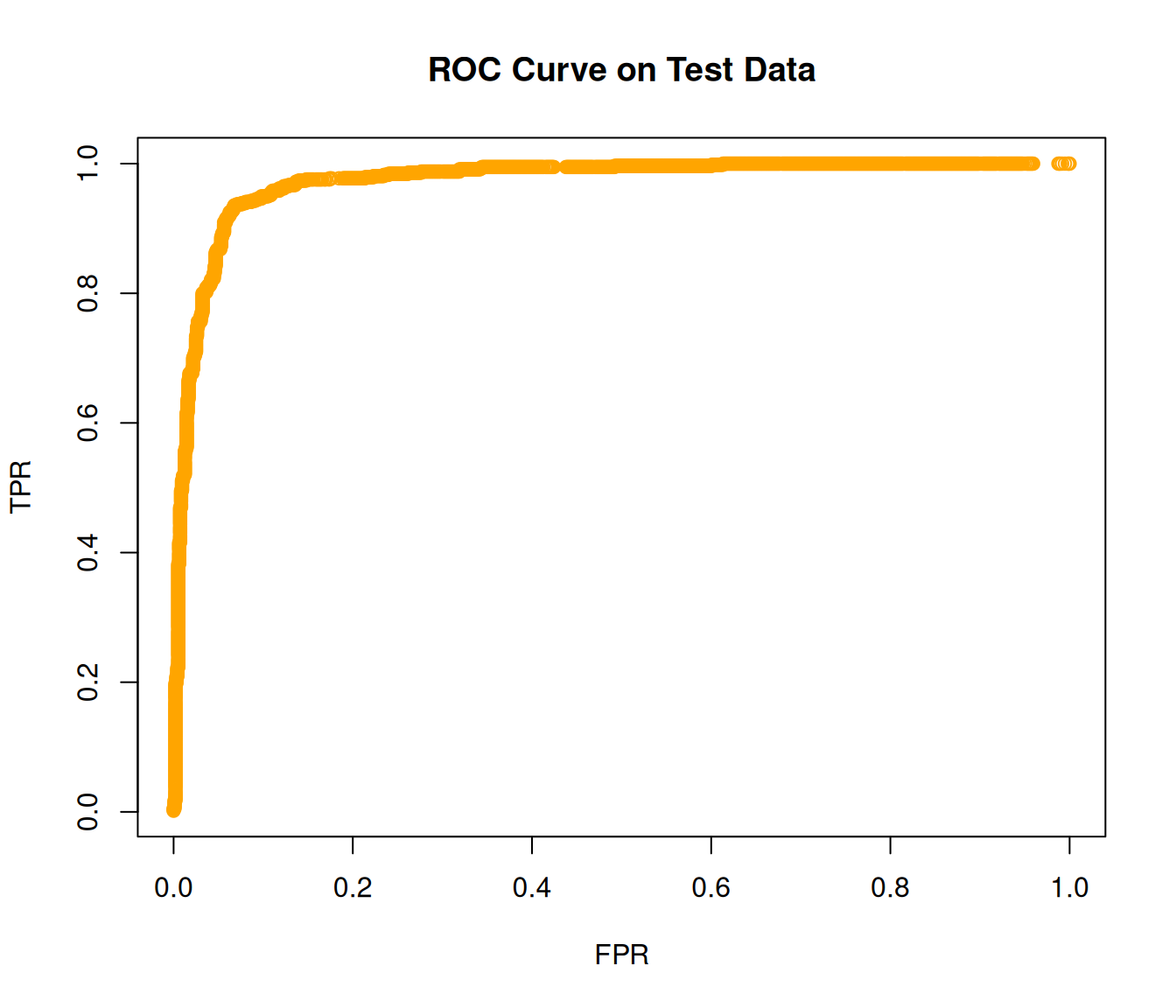
15.4 confusion.glmnet
The confusion.glmnet function is specific to binomial and multinomial data (Chapter 7 and Chapter 8) and produces the confusion matrix for test data. Here is an example of how to use it.
data("MultinomialExample", package = "glmnet")
x <- MultinomialExample$x
y <- MultinomialExample$y
set.seed(101)
itrain <- sample(1:500, 400, replace = FALSE)

cfit <- cv.glmnet(x[itrain, ], y[itrain], family = "multinomial")
cnf <- confusion.glmnet(cfit, newx = x[-itrain, ], newy = y[-itrain])
print(cnf)
#>          True
#> Predicted  1  2  3 Total
#>     1     13  6  4    23
#>     2      7 25  5    37
#>     3      4  3 33    40
#>     Total 24 34 42   100
#>
#>  Percent Correct:  0.71