library(pls)
data(gasoline)2 Regularized regression
2.1 The gasoline dataset
The gasoline dataset in the pls package contains the NIR spectra and octane numbers of 60 gasoline samples. From the dataset help file: “the NIR spectra were measured using diffuse reflectance as log(1/R) from 900 nm to 1700 nm in 2 nm intervals, giving 401 wavelengths.”
# dimensions of feature matrix (X)
dim(gasoline$NIR)
#> [1]  60 401
Here is a histogram plot of the response variable:
hist(gasoline$octane)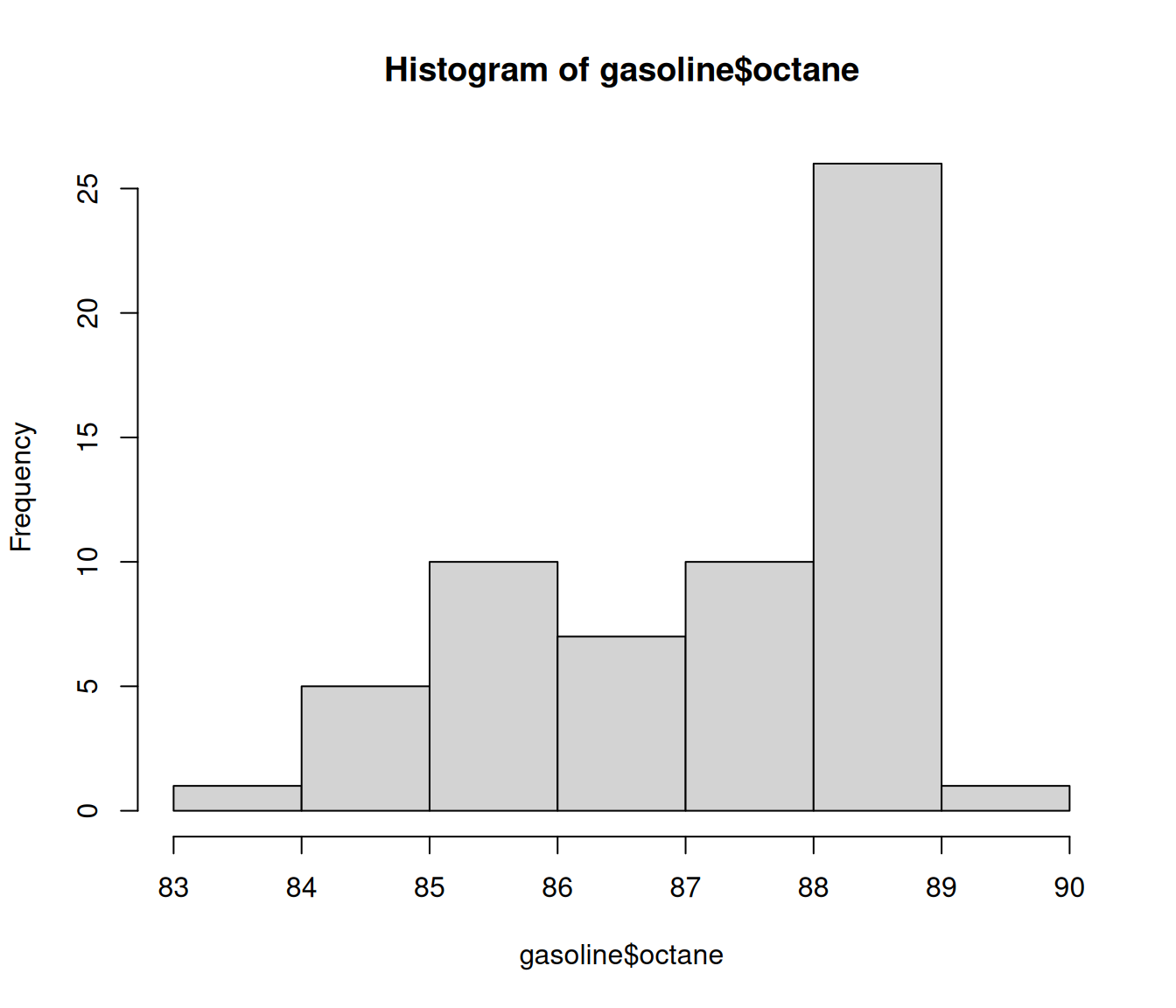
Can we predict the octane number of the gasoline sample from its NIR spectra?
2.2 Issues with ordinary least squares
If we denote the response variable by \(y\) and label the NIR wavelengths as variables \(x_1, \dots, x_{401}\), the ordinary least squares (OLS) model from Section 1.3 would predict \(y\) using the functional form
\[\hat{y} = \hat{\beta}_0 + \hat{\beta}_1 x_1 + \dots + \hat{\beta}_{401}x_{401},\]
and the coefficients \(\hat{\beta}_0, \dots, \hat{\beta}_{401}\) would be determined by minimizing the residual sum of squares:
\[\min_{\beta_0, \beta} \quad \frac{1}{2n}\| \mathbf{y} - \beta_0 \mathbf{1} - \mathbf{X}\beta \|_2^2, \tag{2.1}\]
where we follow the notation in Section 1.3. However, it turns out that there are infinitely many \((\hat\beta_0, \hat{\mathbf{\beta}})\) values such that \(\|\mathbf{y} - \hat{\beta}_0 \mathbf{1} - \mathbf{X}\hat\beta\|_2^2 = 0\); that is, there are infinitely many models which fit the data perfectly! This happens because \(\mathbf{X}\) has 60 rows, which is less than the number of columns (401). If \(\mathbf{X}\) has \(n\) rows and \(p\) columns, whenever \(n < p + 1\), there will be infinitely many \(\mathbf{\beta}\) values which perfectly interpolate the data1. These solutions, despite performing perfectly on the training data, usually have very poor performance on the test set, due to high variance in the estimate of \(\beta\).
Regularization is a tool that decreases variance in the estimate \(\hat\beta\), and makes it possible to fit models when \(p \gg n\). In the following sections, we will show how to use the glmnet package to perform regularized regression in the form of ridge regression, the lasso, and elastic net.
2.3 Ridge regression
Ridge regression, introduced by Hoerl and Kennard (1970), is a tool to stabilize model fitting, especially in high dimensional settings when \(p > n\). Ridge regression works by pulling coefficients toward zero; it chooses coefficients that minimize
\[\min_{\beta_0, \mathbf{\beta}} \quad \frac{1}{2n} \| \mathbf{y} - \beta_0 \mathbf{1} - \mathbf{X\beta} \|_2^2 + \frac{\lambda}{2} \|\beta \|_2^2, \tag{2.2}\]
where \(\|\beta\|_2^2\) is the sum of the squares of the coefficients and \(\lambda\geq 0\) is a hyperparameter to be chosen by the user. This looks very much like OLS — however, now we include the penalty \(\lambda \|\beta \|_2^2\), which encourages our coefficients to be smaller. Importantly, even if \(n < p+1\), ridge has a unique solution as long as \(\lambda > 0\).
The glmnet function in the glmnet package efficiently computes the ridge solution for a dense sequence of \(\lambda\) values. The code below shows how we can do this for the gasoline dataset:
fit <- glmnet(x = gasoline$NIR, y = gasoline$octane, alpha = 0)The glmnet function has two required arguments: the first (x) is the input matrix and the second (y) is the response variable. The third argument, alpha = 0, specifies ridge regression. Other choices of alpha will fit elastic net or lasso models (see the following sections for more detail; the role of alpha is explained in Equation 2.5).
By default, glmnet solves Equation 2.2 for a sequence of \(\lambda\) values. We take up the question of how to select a \(\lambda\) value for your application in Chapter 3 and Chapter 4.
Caution
There are several ways to parametrize the ridge, lasso, and elastic net models. In the objective function which glmnet minimizes, the RSS term is normalized by a factor of \(1/(2n)\). Some other software packages normalize the RSS term by \(1/n\) instead. This could be one of the reasons for discrepancies when comparing results between glmnet and other packages.
glmnet returns an object of class "glmnet", which comes equipped with some useful methods (plot, print, coef and predict). These are illustrated in more detail below, when discussing the lasso.
2.4 Feature selection
Ridge regression performs regularization by shrinking our coefficients toward zero. Some forms of regularization perform feature selection by shrinking certain coefficients exactly to zero, deeming them not useful for prediction in light of the other features. This reduces model complexity, improves interpretability, and often enhances predictive performance, especially in high-dimensional settings where \(p\) is large relative to \(n\).
There are many feature selection methods, including for example, best subset and forward stepwise selection. Here, we focus on the lasso – but for more information on feature selection, please see James et al. (2013) (Chapter 6) and Hastie et al. (2020).
2.5 The lasso
The lasso, proposed by Tibshirani (1996), selects features by placing a “budget” on the total size of the coefficients—we only spend our budget on the most useful features.
Mathematically, the lasso solves this problem:
\[\min_{\beta_0, \mathbf{\beta}} \quad \frac{1}{2n} \| \mathbf{y} - \beta_0 \mathbf{1} - \mathbf{X\beta} \|_2^2 \quad \text{subject to} \quad \|\beta\|_1 \leq \text{budget}, \tag{2.3}\]
where \(\|\cdot\|_1\) is the \(\ell_1\) norm – the sum of the absolute values of the coefficients.
Intuitively, this means we can use any combination of features as long as their total “cost” (sum of absolute values of coefficients) stays within our budget. If a feature isn’t helpful for prediction, we simply don’t spend any budget on it—its coefficient gets set to 0.
In practice, it is more computationally feasible to solve the problem:
\[\min_{\beta_0, \mathbf{\beta}} \quad \frac{1}{2n} \| \mathbf{y} - \beta_0 \mathbf{1} - \mathbf{X\beta} \|_2^2 + \lambda \|\beta \|_1, \tag{2.4}\]
which replaces the hard constraint (\(\|\beta\|_1 \leq \text{budget}\)) with a penalty term (\(\lambda \|\beta\|_1\)) that discourages large coefficients. This is equivalent to Equation 2.3, with a one-to-one correspondence between the parameters \(\text{budget}\) and \(\lambda\). The parameter \(\lambda\) is chosen by the user, and is often selected through cross-validation (Chapter 4). The glmnet package solves this problem for a sequence of \(\lambda\) values using cyclical coordinate descent (see Friedman et al. (2010) for details).
Fitting a lasso model with glmnet is similar to ridge regression, except now we specify alpha = 1:
fit <- glmnet(gasoline$NIR, gasoline$octane, alpha = 1)Note that alpha = 1 is the default in the glmnet package, and we can omit it:
fit <- glmnet(gasoline$NIR, gasoline$octane)fit is an object of class "glmnet". Now, we look at the plot, print, coef and predict methods.
2.5.1 The plot method
The plot method creates a plot of the model coefficients. In this plot, each curve corresponds to an input variable. The plot shows the path of each variable’s coefficient against \(-\log(\lambda)\) — on this scale as we move to the right coefficients are penalized less. The axis above indicates the number of non-zero coefficients at the current \(\lambda\).
plot(fit)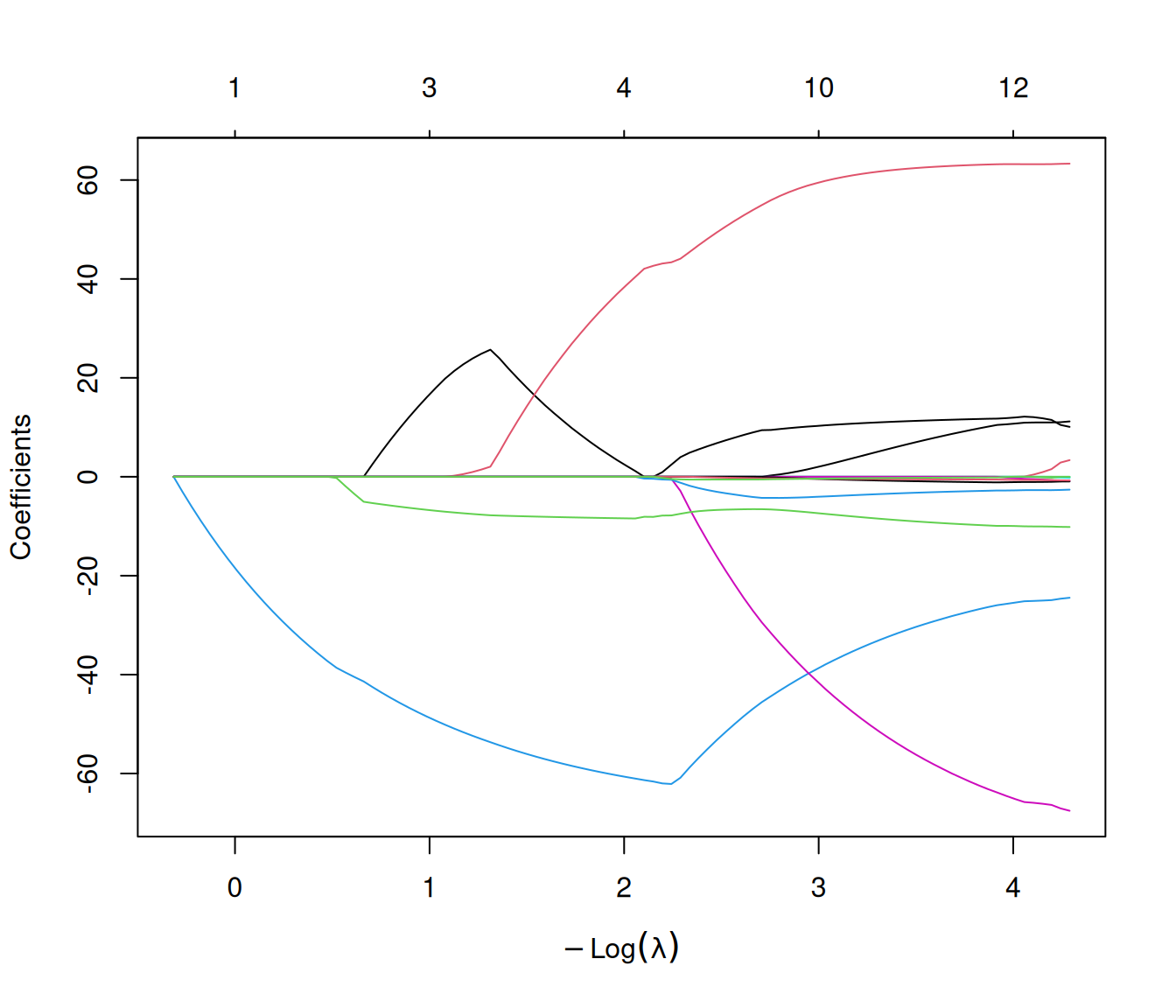
We can annotate the curves with variable numbers by setting label = TRUE in the plot command:
plot(fit, label = TRUE)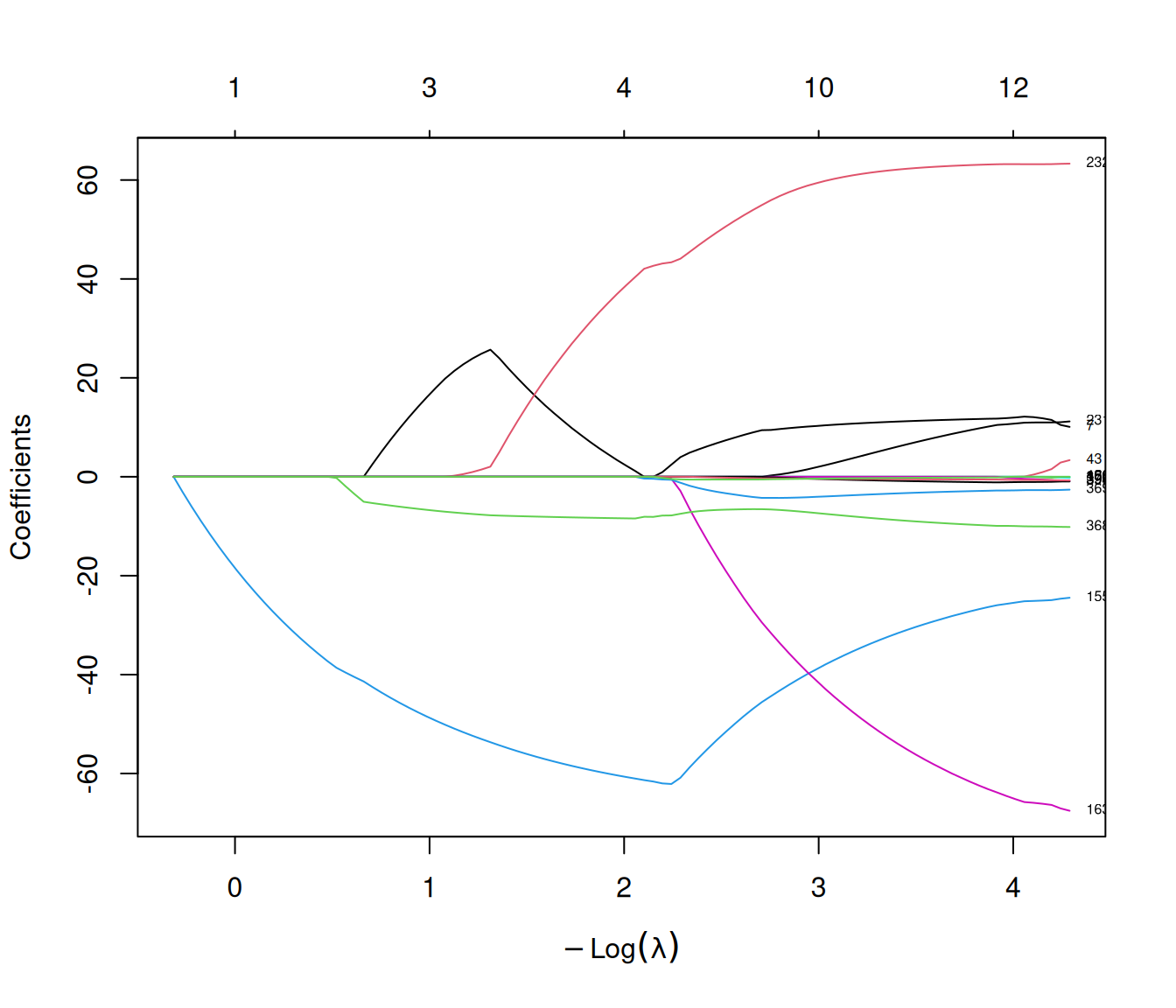
The xvar argument allows us to change what is plotted on the x-axis of the plot. There are 3 possibilities:
xvar = "lambda"(default) for the negative log-lambda values,xvar = "norm"for the \(\ell_1\) norm of the coefficients, andxvar = "dev"for % deviance explained.
Below is the plot of the coefficients vs. the \(\ell_1\) norm of the coefficient vector.
plot(fit, xvar = "norm")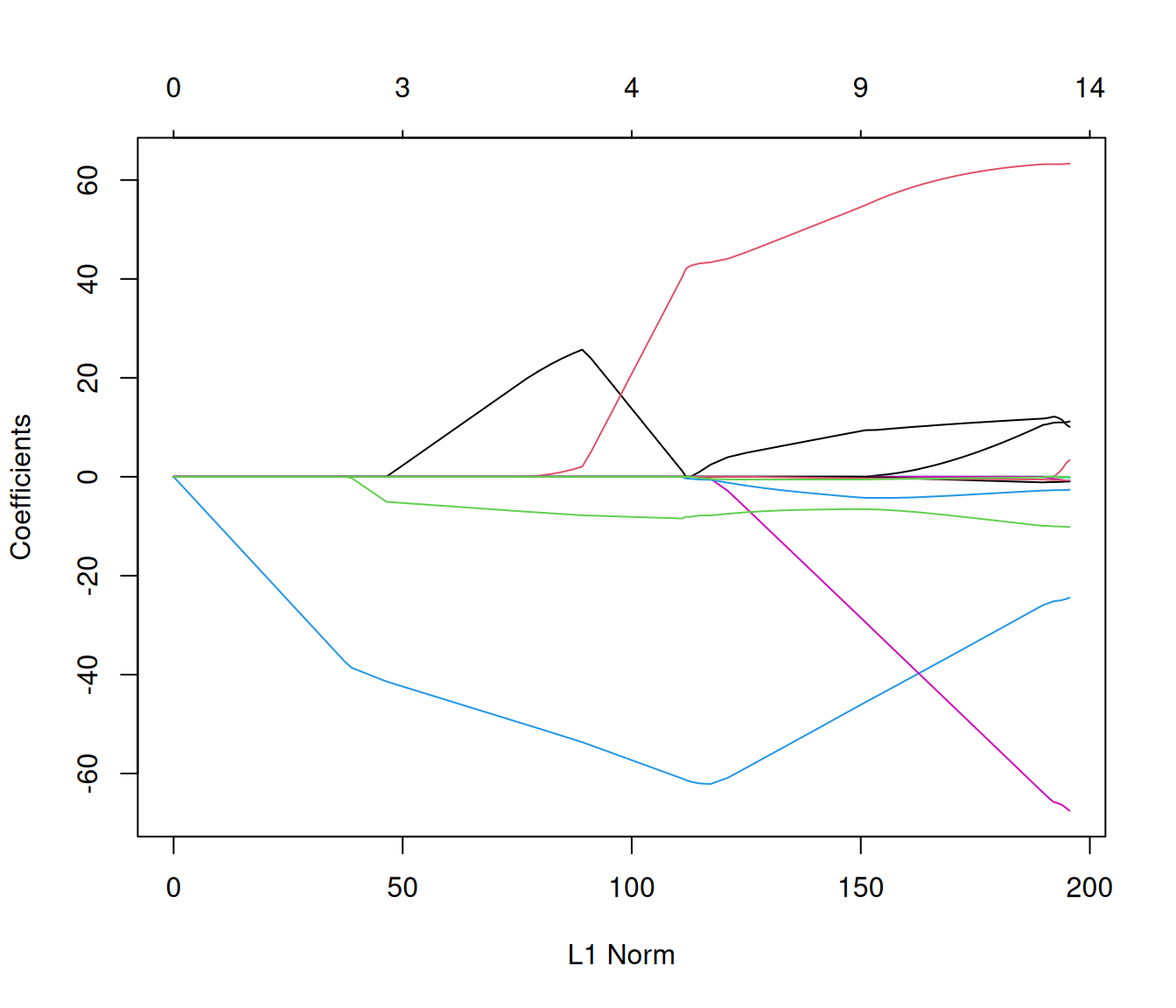
Below is the plot of the coefficients vs. % deviance explained. We see that toward the end of the path, %deviance is not changing much but the coefficients are “blowing up” a bit.
plot(fit, xvar = "dev")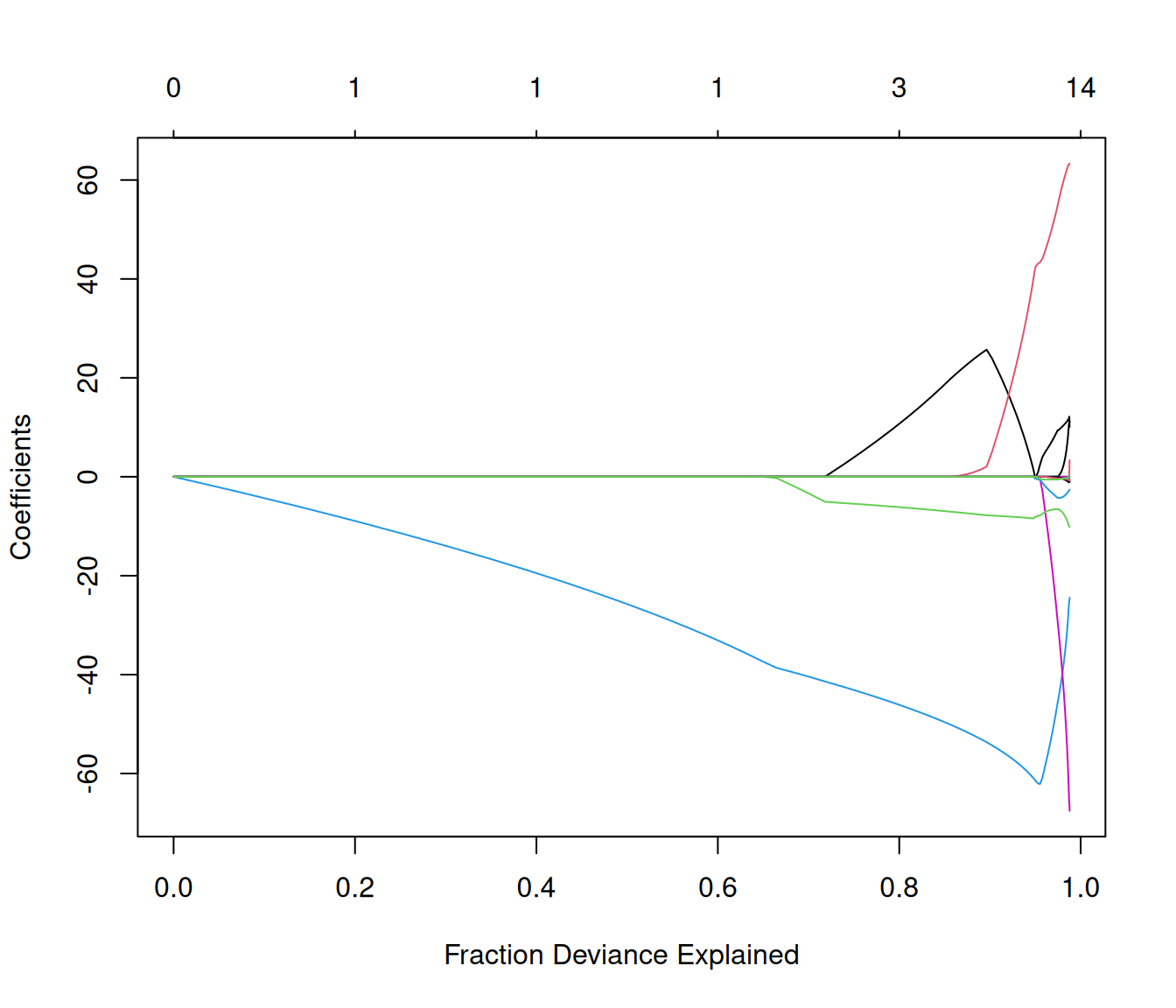
2.5.2 The print method
The print method shows two high-level statistics for each value of lambda at which the lasso solution was computed: Df, which is the number of non-zero coefficients in the model, and %dev, the percentage (of null) deviance explained. Informally, you can think of 0 %dev as the model having no explanatory power at all, and 100 %dev as the model able to completely explain all the variation in the response variable.
print(fit)
#>
#> Call:  glmnet(x = gasoline$NIR, y = gasoline$octane)
#>
#>     Df  %Dev  Lambda
#> 1    0  0.00 1.37100
#> 2    1  7.25 1.30900
#> 3    1 13.86 1.24900
#> 4    1 19.89 1.19200
#> 5    1 25.37 1.13800
#> 6    1 30.37 1.08700
....
2.5.3 The coef method
The coef method prints out the lasso model coefficients for a particular value of the \(\lambda\) parameter. For example, the code below prints out the model coefficients for \(\lambda=0.1\):
coef(fit, s = 0.1)
#> 402 x 1 sparse Matrix of class "dgCMatrix"
#>                     s=0.1
#> (Intercept)  99.585086372
#> 900 nm        .
#> 902 nm        .
#> 904 nm        .
#> 906 nm        .
#> 908 nm        .
#> 910 nm        .
#> 912 nm        4.224202223
....
The returned coefficients are represented in the sparse matrix format. This is because the solutions along the regularization path are often sparse, and hence it is more efficient in time and space to use a sparse format. If you prefer non-sparse format, pipe the output through as.matrix().
Note that s can be any value: it does not have to be one of the \(\lambda\) values at which glmnet found the lasso solution. If s is not in the original lambda path, the default behavior is for the coefficients at s to be determined by linear interpolation. If you want exact values of the coefficients at s, you can set exact = TRUE. You will also have to specify by named argument any data that was used in creating the original fit, in this case x and y.
The code below shows the differences in the coefficients for s = 0.1 (not in the original lambda path) between exact = FALSE and exact = TRUE. There are slight differences: whether the differences matter or not depend on your application.
coef_apprx <- coef(fit, s = 0.1, exact = FALSE)
coef_exact <- coef(fit, s = 0.1, exact = TRUE, x = gasoline$NIR, y = gasoline$octane)
nz_indices <- union(which(coef_apprx != 0), which(coef_exact != 0))
cbind(exact = coef_exact[nz_indices],
      approx = coef_apprx[nz_indices])
#>             exact        approx
#>  [1,]  99.5908575  99.585086372
#>  [2,]   4.2398477   4.224202223
#>  [3,] -60.2697203 -60.258680532
#>  [4,]  -3.8964212  -3.903264596
#>  [5,]  44.4545182  44.478319102
#>  [6,]  -7.2573815  -7.392237515
#>  [7,]  -1.5115640  -1.383407252
#>  [8,]   0.0000000  -0.001186563
#>  [9,]  -0.5393437  -0.539150085
coef(fit) without specifying s returns the coefficient values for the entire lambda path that was fit.
2.5.4 The predict method
The predict method can be used to generate model predictions on new input data. In the code below, we compute the predictions for the first 5 rows of our dataset at two \(\lambda\) values, 0.1 and 0.05.
predict(fit, newx = gasoline$NIR[1:5, ], s = c(0.1, 0.05))
#>     s=0.10   s=0.05
#> 1 85.48210 85.43854
#> 2 84.90486 85.04814
#> 3 88.07651 88.17720
#> 4 83.99461 83.78306
#> 5 88.49730 88.22731
You can specify type = "nonzero" to get the indices of the features with non-zero coefficients (we don’t have to specify newx here):
predict(fit, s = 0.1, type = "nonzero")
#> $`s=0.1`
#> [1]   7 155 163 232 368 369 397 400
2.6 The elastic net
The elastic net was introduced by Zou and Hastie (2005) as an extension to the lasso and ridge models:
\[\min_{\beta_0, \mathbf{\beta}} \quad \frac{1}{2n} \| \mathbf{y} - \beta_0 \mathbf{1} - \mathbf{X\beta} \|_2^2 + \lambda \left(\frac{1-\alpha}{2}\|\beta \|_2^2 + \alpha \|\beta \|_1 \right), \tag{2.5}\] where \(\alpha \in [0, 1]\) is a hyperparameter chosen by the user.
The elastic net interpolates between ridge regression and the lasso: we recover the ridge regression and lasso models when we set \(\alpha = 0\) and \(\alpha = 1\) respectively. The elastic net with \(\alpha=1-\epsilon\) for small \(\epsilon > 0\) (e.g. \(\epsilon=0.05\)) performs much like the lasso, but removes any degeneracies and wild behavior caused by extreme correlations. For a fixed value of \(\lambda\), as the hyperparameter \(\alpha\) increases from 0 to 1, the sparsity of the solution to Equation 2.5 (i.e. number of non-zero entries in \(\beta\)) increases monotonically from 0 to the sparsity of the lasso solution.
The code for fitting an elastic net model with glmnet is almost exactly the same as that for the lasso: simply add the alpha argument to a glmnet function call. For example, the code below fits an elastic net model for a path of lambda parameter values with \(\alpha = 0.5\):
enet_fit <- glmnet(gasoline$NIR, gasoline$octane, alpha = 0.5)The returned object also has class "glmnet", and so comes equipped with the same methods described in Section 2.5.
2.6.1 How to choose the value of \(\alpha\)
We recommend choosing \(\alpha\) according to the following procedure:
If you don’t care about the size of your model (i.e. how sparse it is), use a data-driven hyperparameter selection method such as cross-validation (CV) (discussed in Section 4.4) to select \(\alpha\).
If you care about the size of your model, we recommend using CV (Chapter 4) to compute the CV error for different values of \(\alpha\). After that, make a plot of the CV error vs. model size. Generally speaking you will see a trade-off between model performance in terms of CV error and the size of the model: choose the value of \(\alpha\) that corresponds to your preferred trade-off.
2.7 Weighted least squares
glmnet allows the model to be fit with observation weights. We might do this if we want some observations in the data to carry heavier weight than others. For example:
- If some observations are measured with more accuracy than others, we might want to assign higher weights to more accurate measurements and lower weights to noisier ones.
- If we are trying to fit a binary classification model where the positive cases are rare, we might want to give the positive cases a higher observation weight so that the model will try harder to classify these cases correctly. (We discuss binary classification in more detail in Chapter 7.)
Assume that observation \(i\) has weight \(w_i\). Instead of solving
\[\begin{aligned} \underset{(\beta_0, \beta) \in \mathbb{R}^{p+1}}{\min} \; \frac{1}{2n} \sum_{i=1}^n \left[ y_i - (\beta_0 + \mathbf{x}_i^\top \beta) \right]^2 + \lambda \left(\frac{1-\alpha}{2}\|\beta \|_2^2 + \alpha \|\beta \|_1 \right), \end{aligned}\]
glmnet minimizes
\[\begin{aligned} \underset{(\beta_0, \beta) \in \mathbb{R}^{p+1}}{\min} \; \frac{1}{2n} \sum_{i=1}^n w_i \left[ y_i - (\beta_0 + \mathbf{x}_i^\top \beta) \right]^2 + \lambda \left(\frac{1-\alpha}{2}\|\beta \|_2^2 + \alpha \|\beta \|_1 \right). \end{aligned}\]
Observation weights can be passed to glmnet via the weights argument: it must be a numeric vector of length equal to the number of observations. The default value is \(w_i = 1\) for all \(i\) (that is, solving Equation 2.5). Here is a code example where the first 10 observations each have double the weight of the others.
n <- nrow(gasoline$NIR)
weights <- c(rep(2, 10), rep(1, n - 10))
weighted_fit <- glmnet(gasoline$NIR, gasoline$octane, weights = weights)If the intercept is not included in Equation 2.1, then there will be infinitely many \(\beta\) values which perfectly interpolate the data if \(n \leq p\).↩︎