logistic_reg(penalty = 0.01, mixture = 0.5) |>
  set_engine("glmnet") |>
  translate()
#> Logistic Regression Model Specification (classification)
#>
#> Main Arguments:
#>   penalty = 0.01
#>   mixture = 0.5
#>
#> Computational engine: glmnet
#>
#> Model fit template:
#> glmnet::glmnet(x = missing_arg(), y = missing_arg(), weights = missing_arg(),
#> alpha = 0.5, family = "binomial")23 Tidy modeling with glmnet
There are many packages on CRAN for fitting a variety of models. The stats package that comes with R provides two functions that users encounter most often for fitting models: lm() for linear model and glm() for generalized linear model. They come with associated generic functions, update(model, ...) , predict(model, ...) that allow for updating a model with new data or for predicting the model response at a new x (Chambers and Hastie 1992). (Generic merely refers to the fact that the actual implementation is delegated to a method defined for model class: predict.lm() or predict.glm() are the actual implementations of the predict method for lm or glm class objects respectively.)
Objects returned from a glmnet() call are of class glmnet and have predict methods defined for them. So one can build efficient workflows to fit a model, tune a hyperparameter, and do prediction with a chosen model (per some criterion). For example, one can use cv.glmnet() to cross-validate a lasso model over \(\lambda\) values, select an optimal model corresponding to \(\lambda_{min}\), and then use the resulting model in downstream in predictive analysis.
However, there are many other packages on CRAN that do not provide such uniform interfaces for fitting models, tuning and predicting and extracting results. The tidymodels framework (Kuhn and Silge 2022) addresses this non-uniformity by providing a unified, tidy interface for R packages—much as scikit-learn (Pedregosa et al. 2011) does for Python.
In this chapter, we show how to use tidymodels with glmnet. We assume familiarity with glmnet’s core concepts: the elastic net penalty and the roles of \(\alpha\) and \(\lambda\) (Chapter 2), the lambda path (Chapter 3), cross-validation for choosing \(\lambda\) (Chapter 4), and standardization (Chapter 5).
23.1 What is tidymodels?
Tidymodels is a collection of R packages that share the design philosophy of the tidyverse: tidy data, pipeable operations, and consistent APIs. At a high level, tidymodels breaks modeling into explicit pieces (Kuhn and Silge 2022; tidymodels, n.d.):
- parsnip defines the model specification separately from fitting it. A model specification declares the type of model (e.g. linear regression) and the engine—the underlying fitting function that does the computation (e.g.
"glmnet"forglmnet::glmnet(),"lm"forstats::lm(),"stan"forrstanarm::stan_glm()). - recipes defines preprocessing and feature engineering steps such as dummy-variable creation and normalization.
- workflows bundles a recipe and a model specification into one object that can be fit and then used for prediction.
- rsample handles training/test splits and resampling.
- tune handles hyperparameter search and model selection.
- yardstick provides metrics, while dials provides parameter objects such as
penalty()andmixture().
For readers familiar with scikit-learn, the following table maps the key concepts (see also Appendix D):
| scikit-learn | tidymodels | Practical meaning |
|---|---|---|
| estimator object | parsnip model specification |
declare model type and engine |
| data transformation / preprocessing step | recipes step |
step_dummy(), step_normalize(), etc. |
Pipeline |
workflow() |
bundle preprocessing and model fitting |
fit(X, y) |
fit() or fit_xy() |
train the model specification or workflow |
| cross-validation / grid search | rsample + tune |
resampling plus parameter search |
| metrics API | yardstick |
rmse(), roc_auc(), accuracy(), and more |
In scikit-learn, a Pipeline chains data transformation steps with a final predictor (Pedregosa et al. 2011). In tidymodels, a workflow() plays the same role (Kuhn and Silge 2022).
23.2 How parsnip wraps glmnet
The parsnip package provides model specifications that use glmnet as an engine. The parameter mapping is (Kuhn and Silge 2022; tidymodels, n.d.):
| parsnip | glmnet | Meaning |
|---|---|---|
penalty |
lambda |
Regularization strength (see Chapter 3) |
mixture |
alpha |
L1/L2 mixing—1 = lasso, 0 = ridge (see Chapter 2) |
This mapping lets you use the same vocabulary across engines even when the underlying argument names differ.
23.2.1 Why penalty is a single value
A common surprise is that tidymodels asks you to specify a single penalty value even though glmnet internally fits a full path (see Chapter 3 for details on the path). The reason is that tidymodels prediction methods are designed around making predictions for one chosen model configuration at a time. The underlying fit still uses the full coefficient path.
We can see this by using translate() to inspect what parsnip generates:
Notice that lambda is not passed to glmnet::glmnet(). The chosen penalty is used later when tidymodels extracts coefficients or produces predictions.
23.2.2 multi_predict() for multiple penalties
If you want predictions for several penalties from one fitted object, tidymodels provides multi_predict() for glmnet engines:
mpg_fit <-
  linear_reg(penalty = 0.01, mixture = 1) |>
  set_engine("glmnet") |>
  fit(mpg ~ ., data = mtcars)

multi_predict(mpg_fit, mtcars[1:3, ], penalty = c(0.001, 0.01, 0.1))
#> # A tibble: 3 × 1
#>   .pred
#>   <list>
#> 1 <tibble [3 × 2]>
#> 2 <tibble [3 × 2]>
#> 3 <tibble [3 × 2]>
23.2.3 path_values for an explicit lambda grid
The parsnip glmnet engine accepts a special engine argument called path_values. This lets you set the regularization path used under the hood, independently of the single penalty value you declare at the tidymodels level. This is useful when:
- you want the same lambda grid across resamples,
- you want coefficients at specific penalty values, or
- you want a ridge-style path that explicitly includes zero.
ridge_spec <-
  linear_reg(penalty = 0.1, mixture = 0) |>
  set_engine("glmnet",
             path_values = c(0, 10 ^ seq(-5, 1, length.out = 50)))
23.2.4 Supported model types
glmnet engines are available for the following model types, each corresponding to a glmnet family covered in earlier chapters:
| parsnip specification | glmnet family | Mode | Book chapter |
|---|---|---|---|
linear_reg() |
gaussian | regression | Chapter 2 |
logistic_reg() |
binomial | classification | Chapter 7 |
multinom_reg() |
multinomial | classification | Chapter 8 |
poisson_reg() |
poisson | regression | Chapter 9 |
proportional_hazards() |
cox | censored regression | Chapter 12 |
The last requires the censored package (FColumn and Kuhn 2023).
All of these support two tuning parameters (penalty and mixture), sparse data, and case weights. You can always call translate() on a model specification to inspect the underlying call template.
23.2.5 Passing engine-specific arguments
Beyond penalty and mixture, glmnet has many arguments that control model fitting. These are passed verbatim through set_engine():
linear_reg(penalty = 0.1, mixture = 1) |>
  set_engine("glmnet",
             penalty.factor = pf_vec,
             lower.limits = 0,       # non-negative coefficients
             standardize = FALSE,    # if recipe already normalizes
             thresh = 1e-08,
             maxit = 1e6)
23.2.5.1 penalty.factor: Differential penalization
The penalty.factor argument is a vector of per-coefficient penalty multipliers (see Chapter 19 for a full treatment). Setting an element to 0 means that variable is never penalized (always included); values greater than 1 penalize more aggressively.
# Fit lasso on mtcars, but never penalize `wt`
mt_x <- as.matrix(mtcars[, -1])
mt_y <- mtcars$mpg

# penalty.factor: 0 for wt (column 5), 1 for all others
pf <- rep(1, ncol(mt_x))
pf[which(colnames(mt_x) == "wt")] <- 0

pf_fit <- linear_reg(penalty = 0.5, mixture = 1) |>
  set_engine("glmnet", penalty.factor = pf) |>
  fit_xy(x = mt_x, y = mt_y)

tidy(pf_fit)
#> # A tibble: 11 × 3
#>   term           estimate penalty
#>   <chr>             <dbl>   <dbl>
#> 1 (Intercept) 26.8            0.5
#> 2 cyl         -0.00000581     0.5
#> 3 disp         0              0.5
#> 4 hp          -0.00200        0.5
#> 5 drat         0              0.5
#> 6 wt          -5.07           0.5
#> # ℹ 5 more rows
23.2.5.2 lower.limits and upper.limits: Coefficient bounds
These constrain the sign or range of coefficients. Pass a scalar (applied to all) or a vector (one per predictor in the model matrix). See Chapter 16 for additional details and examples.
# Non-negative lasso coefficients
nn_fit <- linear_reg(penalty = 0.1, mixture = 1) |>
  set_engine("glmnet", lower.limits = 0) |>
  fit_xy(x = mt_x, y = mt_y)

tidy(nn_fit)
#> # A tibble: 11 × 3
#>   term        estimate penalty
#>   <chr>          <dbl>   <dbl>
#> 1 (Intercept)    -8.72     0.1
#> 2 cyl             0        0.1
#> 3 disp            0        0.1
#> 4 hp              0        0.1
#> 5 drat            2.01     0.1
#> 6 wt              0        0.1
#> # ℹ 5 more rows
23.2.5.3 exclude: Excluding predictors
The exclude argument accepts column indices of predictors to drop entirely from the model. However, for tidymodels workflows, it is generally safer to use step_rm() in the recipe, since recipe steps may change column indices (see the warning below).
WarningPositional arguments require care in workflows
Arguments that use column positions or per-column vectors— penalty.factor, exclude, lower.limits, upper.limits— must match the expanded model matrix after all recipe steps (dummy encoding, zero-variance removal, etc.), not the original data. If your recipe changes column count or order, these vectors will silently be wrong.
To use them safely:
prep()your recipe and inspect the baked output to verify column names and order.- Construct the vector based on the baked column names.
- Or, use
fit_xy()with a pre-built matrix to keep full control over column order.
23.2.6 cv.glmnet vs. tidymodels tuning
A natural question is whether tidymodels uses cv.glmnet() internally. It does not. Tidymodels has its own resampling framework (vfold_cv() + tune_grid()) that works uniformly across all engines. The glmnet-specific type.measure argument is therefore irrelevant; you control the evaluation metric through metric_set() passed to tune_grid().
The tidymodels approach is more general (any model, any resampling scheme, any preprocessing) but is slower than cv.glmnet() for pure glmnet tuning, because cv.glmnet() is a highly optimized special-purpose function (see Section 4.2). Tidymodels partly compensates by fitting glmnet once per resample fold and obtaining predictions at many penalty values from that single fit (Kuhn and Silge 2022).
23.3 Preprocessing for glmnet in tidymodels
As discussed in Chapter 5 and Section 6.2, glmnet requires a numeric predictor matrix, and predictors should be on a comparable scale. When using tidymodels, we handle this with a recipe. A good baseline recipe for glmnet includes (Kuhn and Silge 2022):
glmnet_rec <-
  recipe(outcome ~ ., data = train_data) |>
  step_impute_median(all_numeric_predictors()) |>
  step_impute_mode(all_nominal_predictors()) |>
  step_dummy(all_nominal_predictors(), one_hot = TRUE) |>
  step_zv(all_predictors()) |>
  step_normalize(all_numeric_predictors())
Why these steps?
step_impute_*()handles missing values (see Section 23.3.1).step_dummy(one_hot = TRUE)creates indicator columns using full one-hot encoding (see Section 23.3.2).step_zv()removes predictors with zero variance.step_normalize()makes scaling explicit and portable across resamples and deployments.
Note
If you use a workflow with a recipe, let the workflow own preprocessing. The workflow prediction method already applies the stored recipe to new_data, so you should not manually bake() before calling predict() on the workflow (Kuhn and Silge 2022).
23.3.1 Handling missing values
glmnet cannot handle missing values: it requires a complete numeric matrix and will error if any NA values are present. While glmnet provides a basic na.replace() helper (column-mean imputation) and makeX(..., na.impute = TRUE), these are rudimentary.
The recipes package provides a richer set of imputation steps, all of which learn parameters from the training data during prep() and apply them consistently to new data during bake(), preventing data leakage:
| Step | Types | Method |
|---|---|---|
step_impute_mean() |
numeric | Column mean |
step_impute_median() |
numeric | Column median |
step_impute_mode() |
nominal | Most frequent value |
step_impute_linear() |
numeric | Linear regression from other predictors |
step_impute_knn() |
numeric + nominal | \(k\)-nearest neighbors |
step_impute_bag() |
numeric + nominal | Bagged tree models |
For simple cases, step_impute_median() and step_impute_mode() suffice. For more principled imputation, step_impute_knn() or step_impute_bag() are recommended since they handle both numeric and categorical variables and can capture non-linear relationships.
Important
Place imputation steps before dummy-variable creation and normalization in the recipe so that downstream steps receive complete data.
23.3.2 Dummy vs. one-hot encoding for penalized models
The choice between dummy coding and one-hot encoding is particularly consequential for penalized regression—more so than for unpenalized models.
23.3.2.1 The asymmetry problem
With dummy coding (step_dummy(), the default), a factor with \(C\) levels produces \(C - 1\) indicator columns. One level—the reference—is absorbed into the intercept. Since glmnet never penalizes the intercept, this creates an asymmetry:
- The reference level’s effect is captured by the unpenalized intercept.
- All other levels’ coefficients are penalized and shrunk toward the reference level.
This means the choice of reference level affects which coefficients get shrunk and can change variable selection results (Tay et al. 2023). Different reference levels can yield different selected variables—a troubling lack of robustness.
23.3.2.2 One-hot encoding restores symmetry
With one-hot encoding (step_dummy(one_hot = TRUE)), all \(C\) levels get their own indicator column and all are penalized equally. The apparent multicollinearity (the \(C\) columns sum to 1) is not a problem: handling collinearity is precisely what regularization does.
Notably, glmnet’s own makeX() function uses full one-hot encoding by default, creating all \(C\) columns for each factor. This is a strong signal that the glmnet authors themselves recommend this approach for penalized models.
For these reasons, we recommend using step_dummy(all_nominal_predictors(), one_hot = TRUE) in recipes for glmnet. Let’s see the difference:
library(tibble)

# Small example: mtcars with cyl as a factor
mt <- mtcars |>
  mutate(cyl = factor(cyl))

# Dummy encoding (C-1): reference level (4-cyl) absorbed into intercept
dummy_rec <- recipe(mpg ~ cyl + hp + wt, data = mt) |>
  step_dummy(all_nominal_predictors()) |>
  step_normalize(all_numeric_predictors())

dummy_fit <- workflow() |>
  add_recipe(dummy_rec) |>
  add_model(linear_reg(penalty = 0.5, mixture = 1) |> set_engine("glmnet")) |>
  fit(data = mt)

cat("Dummy encoding (C-1) coefficients:\n")
#> Dummy encoding (C-1) coefficients:
tidy(extract_fit_parsnip(dummy_fit))
#> # A tibble: 5 × 3
#>   term        estimate penalty
#>   <chr>          <dbl>   <dbl>
#> 1 (Intercept)  20.1        0.5
#> 2 hp           -1.89       0.5
#> 3 wt           -3.42       0.5
#> 4 cyl_X6       -0.273      0.5
#> 5 cyl_X8       -0.0941     0.5

# One-hot encoding (C): all levels penalized equally
onehot_rec <- recipe(mpg ~ cyl + hp + wt, data = mt) |>
  step_dummy(all_nominal_predictors(), one_hot = TRUE) |>
  step_normalize(all_numeric_predictors())

onehot_fit <- workflow() |>
  add_recipe(onehot_rec) |>
  add_model(linear_reg(penalty = 0.5, mixture = 1) |> set_engine("glmnet")) |>
  fit(data = mt)

cat("\nOne-hot encoding (C) coefficients:\n")
#>
#> One-hot encoding (C) coefficients:
tidy(extract_fit_parsnip(onehot_fit))
#> # A tibble: 6 × 3
#>   term        estimate penalty
#>   <chr>          <dbl>   <dbl>
#> 1 (Intercept)    20.1      0.5
#> 2 hp             -1.31     0.5
#> 3 wt             -2.87     0.5
#> 4 cyl_X4          1.42     0.5
#> 5 cyl_X6          0        0.5
#> 6 cyl_X8          0        0.5
23.4 Workflow examples
23.4.1 Example 1: Lasso regression
We use the Ames housing data (included in the modeldata package) to predict sale price. Compare this with the direct glmnet approach in Chapter 2.
data(ames, package = "modeldata")
ames <- ames |> mutate(Sale_Price = log10(Sale_Price))

# Split data
set.seed(502)
ames_split <- initial_split(ames, prop = 0.80, strata = Sale_Price)
ames_train <- training(ames_split)
ames_test  <- testing(ames_split)

# Preprocessing recipe
ames_rec <- recipe(Sale_Price ~ Neighborhood + Gr_Liv_Area +
                     Year_Built + Bldg_Type + Latitude + Longitude,
                   data = ames_train) |>
  step_log(Gr_Liv_Area, base = 10) |>
  step_dummy(all_nominal_predictors(), one_hot = TRUE) |>
  step_zv(all_predictors()) |>
  step_normalize(all_numeric_predictors())

# Model specification: lasso via glmnet
lasso_spec <- linear_reg(penalty = 0.001, mixture = 1) |>
  set_engine("glmnet")

# Bundle into a workflow
lasso_wf <- workflow() |>
  add_recipe(ames_rec) |>
  add_model(lasso_spec)

# Fit
lasso_fit <- fit(lasso_wf, data = ames_train)

# Predict on test set
ames_preds <- augment(lasso_fit, new_data = ames_test)
ames_preds |>
  metrics(truth = Sale_Price, estimate = .pred)
#> # A tibble: 3 × 3
#>   .metric .estimator .estimate
#>   <chr>   <chr>          <dbl>
#> 1 rmse    standard      0.0760
#> 2 rsq     standard      0.826
#> 3 mae     standard      0.0557
23.4.2 Example 2: Tuning the penalty with cross-validation
We can mark penalty for tuning with tune() and search over a grid. Evaluating many penalty values is relatively cheap for glmnet because tidymodels fits glmnet once per resample fold and obtains predictions at many penalty values from that single fit. Compare this with the cv.glmnet() approach in Section 4.2.
# Model specification with tunable penalty
tune_spec <- linear_reg(penalty = tune(), mixture = 1) |>
  set_engine("glmnet")

# Update the workflow
tune_wf <- lasso_wf |>
  update_model(tune_spec)

# Create resamples
set.seed(1001)
ames_folds <- vfold_cv(ames_train, v = 5, strata = Sale_Price)

# Define a penalty grid
lambda_grid <- grid_regular(penalty(range = c(-5, -1)), levels = 30)

# Tune
tune_res <- tune_grid(
  tune_wf,
  resamples = ames_folds,
  grid = lambda_grid,
  control = control_grid(save_pred = FALSE)
)

autoplot(tune_res)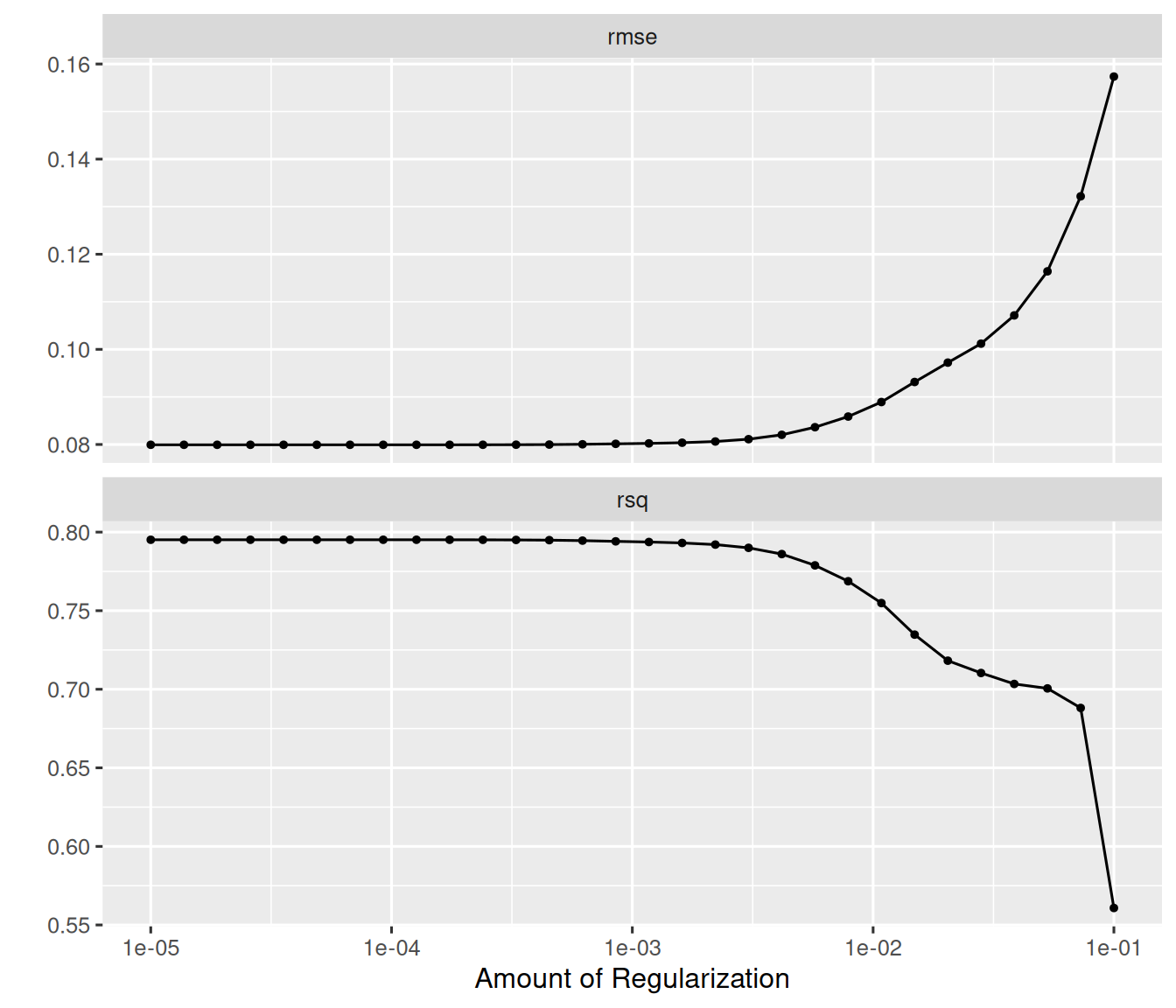
# Select the best penalty
best_penalty <- select_best(tune_res, metric = "rmse")
best_penalty
#> # A tibble: 1 × 2
#>    penalty .config
#>      <dbl> <chr>
#> 1 0.000127 pre0_mod09_post0

# Finalize the workflow and do a last fit on the full training set
final_wf <- finalize_workflow(tune_wf, best_penalty)
final_fit <- last_fit(final_wf, ames_split)

# Test set performance
collect_metrics(final_fit)
#> # A tibble: 2 × 4
#>   .metric .estimator .estimate .config
#>   <chr>   <chr>          <dbl> <chr>
#> 1 rmse    standard      0.0759 pre0_mod0_post0
#> 2 rsq     standard      0.826  pre0_mod0_post0
23.4.3 Example 3: Ridge logistic regression
Here we fit a ridge logistic regression to classify penguin species from the palmerpenguins package. For the direct glmnet approach to binary classification, see Chapter 7.
library(palmerpenguins)
penguins_clean <- palmerpenguins::penguins |>
  drop_na() |>
  filter(species != "Chinstrap") |>    # binary classification
  mutate(species = factor(species))

set.seed(42)
pen_split <- initial_split(penguins_clean, prop = 0.75, strata = species)
pen_train <- training(pen_split)
pen_test  <- testing(pen_split)

# Recipe
pen_rec <- recipe(species ~ bill_length_mm + bill_depth_mm +
                    flipper_length_mm + body_mass_g,
                  data = pen_train) |>
  step_normalize(all_numeric_predictors())

# Ridge logistic regression (mixture = 0)
ridge_lr_spec <- logistic_reg(penalty = 0.01, mixture = 0) |>
  set_engine("glmnet")

ridge_lr_wf <- workflow() |>
  add_recipe(pen_rec) |>
  add_model(ridge_lr_spec)

ridge_lr_fit <- fit(ridge_lr_wf, data = pen_train)

# Evaluate
pen_preds <- augment(ridge_lr_fit, new_data = pen_test)
pen_preds |>
  metrics(truth = species, estimate = .pred_class)
#> # A tibble: 2 × 3
#>   .metric  .estimator .estimate
#>   <chr>    <chr>          <dbl>
#> 1 accuracy binary             1
#> 2 kap      binary             1

pen_preds |>
  roc_auc(truth = species, .pred_Adelie)
#> # A tibble: 1 × 3
#>   .metric .estimator .estimate
#>   <chr>   <chr>          <dbl>
#> 1 roc_auc binary             1
23.4.4 Example 4: Elastic net with both parameters tuned
When both penalty and mixture are unknown, we can tune them jointly. For glmnet, it is common to search penalty on a log scale and mixture over a small set of values. For background on the elastic net penalty, see Section 2.6.
enet_spec <- linear_reg(penalty = tune(), mixture = tune()) |>
  set_engine("glmnet")

enet_wf <- lasso_wf |>
  update_model(enet_spec)

# A regular grid over both parameters
enet_grid <- grid_regular(
  penalty(range = c(-5, -1)),
  mixture(range = c(0, 1)),
  levels = c(20, 5)
)

enet_res <- tune_grid(
  enet_wf,
  resamples = ames_folds,
  grid = enet_grid
)

autoplot(enet_res)
show_best(enet_res, metric = "rmse", n = 5)
#> # A tibble: 5 × 8
#>     penalty mixture .metric .estimator   mean     n std_err .config
#>       <dbl>   <dbl> <chr>   <chr>       <dbl> <int>   <dbl> <chr>
#> 1 0.00001      0.25 rmse    standard   0.0799     5 0.00256 pre0_mod002_post0
#> 2 0.0000162    0.25 rmse    standard   0.0799     5 0.00256 pre0_mod007_post0
#> 3 0.0000264    0.25 rmse    standard   0.0799     5 0.00256 pre0_mod012_post0
#> 4 0.0000428    0.25 rmse    standard   0.0799     5 0.00256 pre0_mod017_post0
#> 5 0.0000695    0.25 rmse    standard   0.0799     5 0.00256 pre0_mod022_post0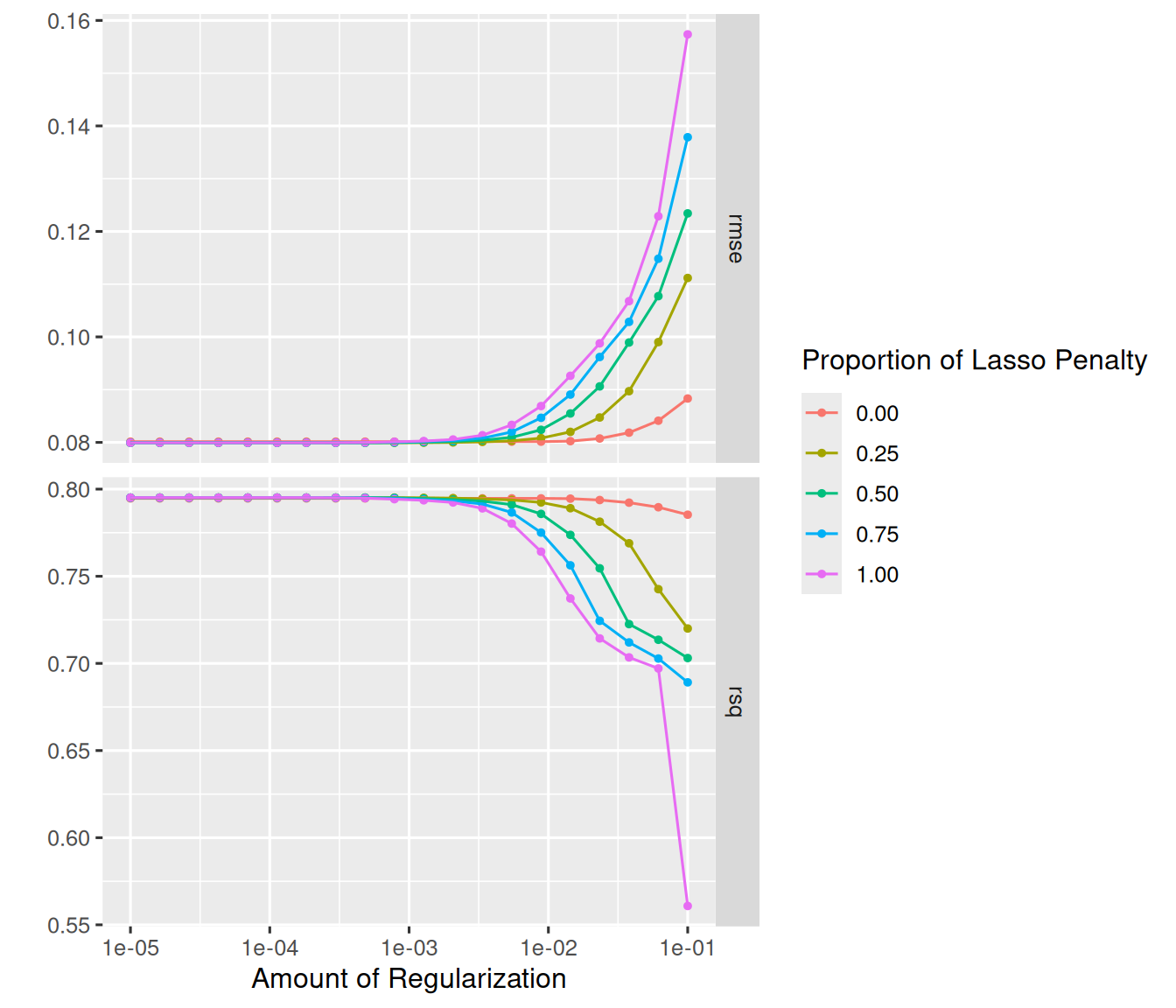
23.5 Extracting the underlying glmnet object
Sometimes you need the raw glmnet fit for diagnostics or coefficient path plots. You can extract it from the workflow:
# From the finalized lasso fit
final_fitted <- final_fit |>
  extract_fit_engine()

# This is a standard glmnet object
class(final_fitted)
#> [1] "elnet"  "glmnet"
plot(final_fitted, xvar = "lambda", label = TRUE)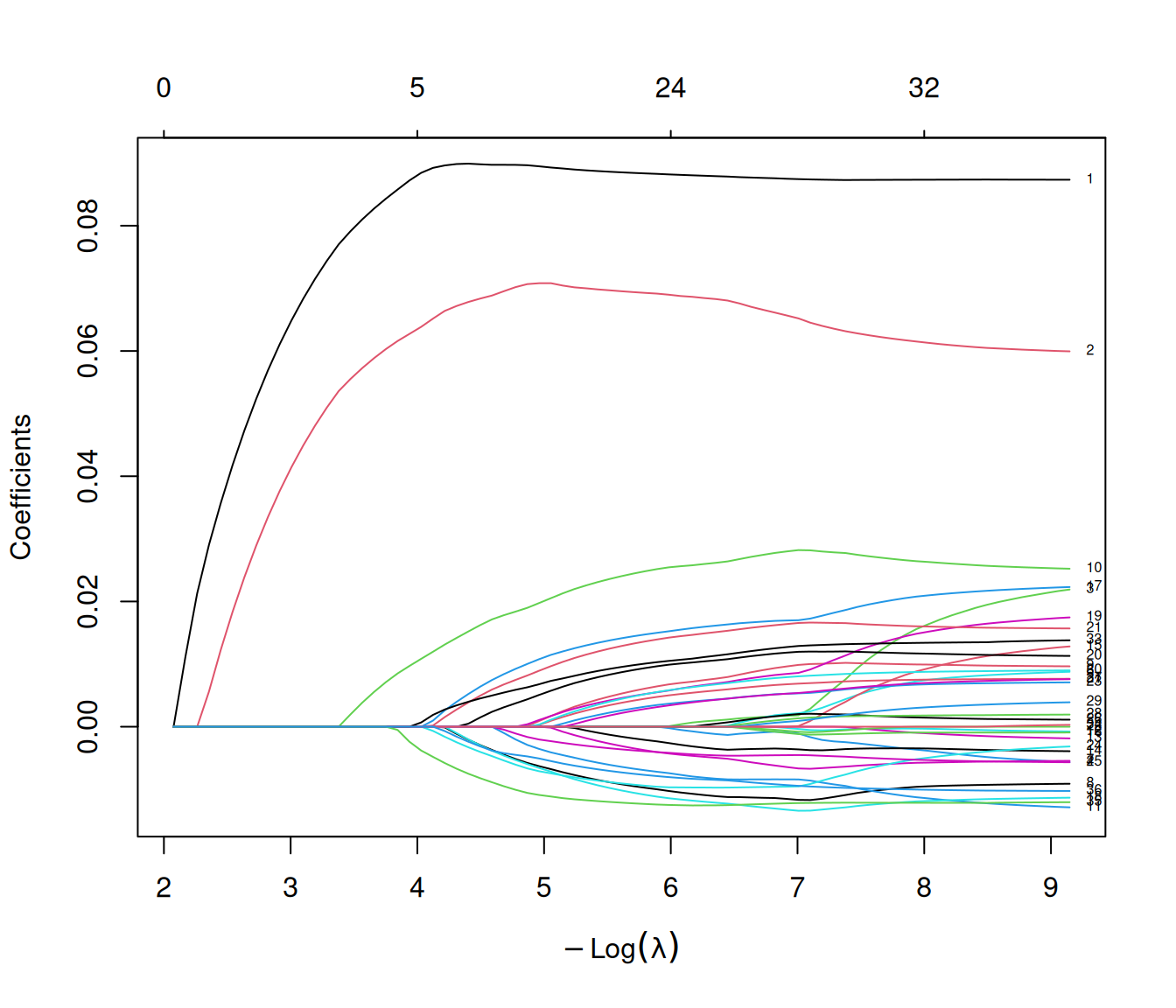
You can also extract the parsnip-level fit and tidy the coefficients:
# Fit finalized workflow on full training data for a reusable object
final_wf_fit <- fit(final_wf, data = ames_train)

final_wf_fit |>
  extract_fit_parsnip() |>
  tidy()
#> # A tibble: 38 × 3
#>   term                    estimate  penalty
#>   <chr>                      <dbl>    <dbl>
#> 1 (Intercept)              5.22    0.000127
#> 2 Gr_Liv_Area              0.0873  0.000127
#> 3 Year_Built               0.0601  0.000127
#> 4 Latitude                 0.0214  0.000127
#> 5 Longitude               -0.00548 0.000127
#> 6 Neighborhood_North_Ames  0       0.000127
#> # ℹ 32 more rows
Warning
The extraction helpers in workflows are meant for model inspection, not for bypassing the workflow during prediction. Always use predict(workflow_fit, new_data = ...) so that preprocessing remains synchronized (Kuhn and Silge 2022).
23.6 Common pitfalls
Confusing penalty with the full path. In tidymodels, penalty is the chosen operating point, even though the underlying glmnet fit contains the full lambda path (see Chapter 3). If you need predictions at multiple penalties, use multi_predict().
Letting preprocessing happen in too many places. If you use a recipe, keep dummying and scaling in the recipe. That makes the workflow self-documenting and ensures the same preprocessing is reused at prediction time (Kuhn and Silge 2022).
Forgetting that glmnet wants numeric predictors. Factor predictors need to be converted to numeric indicator columns. See Section 6.2 for how glmnet handles this natively, and Section 23.3.2 above for the recipe-based approach.
Ignoring sparsity when the design matrix is huge. Both glmnet and the parsnip glmnet engines support sparse representations, which can matter a great deal in text, one-hot encoded, or otherwise high-dimensional designs.
Using an extracted engine object for prediction. The workflow extraction helpers are useful for inspection, but using an extracted model directly for prediction can bypass preprocessing and silently produce incorrect results.