data("QuickStartExample")
x <- QuickStartExample$x
y <- QuickStartExample$y

set.seed(1)
cvfit <- cv.glmnet(x, y)4 Cross-validation
In Section 3.3, we suggested selecting the \(\lambda\) hyperparameter using a training-test split of your data. What can you do if you do not have enough data to do a training-test split? We turn to cross-validation as a potential solution.
4.1 What is cross-validation?
\(K\)-fold cross-validation (CV) is a popular method for selecting hyperparameters for supervised learning models. In \(K\)-fold CV, the training dataset is used for both training and testing in an unbiased way.
How does \(K\)-fold CV work?
Step 1: Fix a path of \(\lambda\) values \(\lambda_1, \lambda_2, \dots\) at which we want to evaluate CV error. (glmnet can generate these values automatically for you; see Chapter 3.)
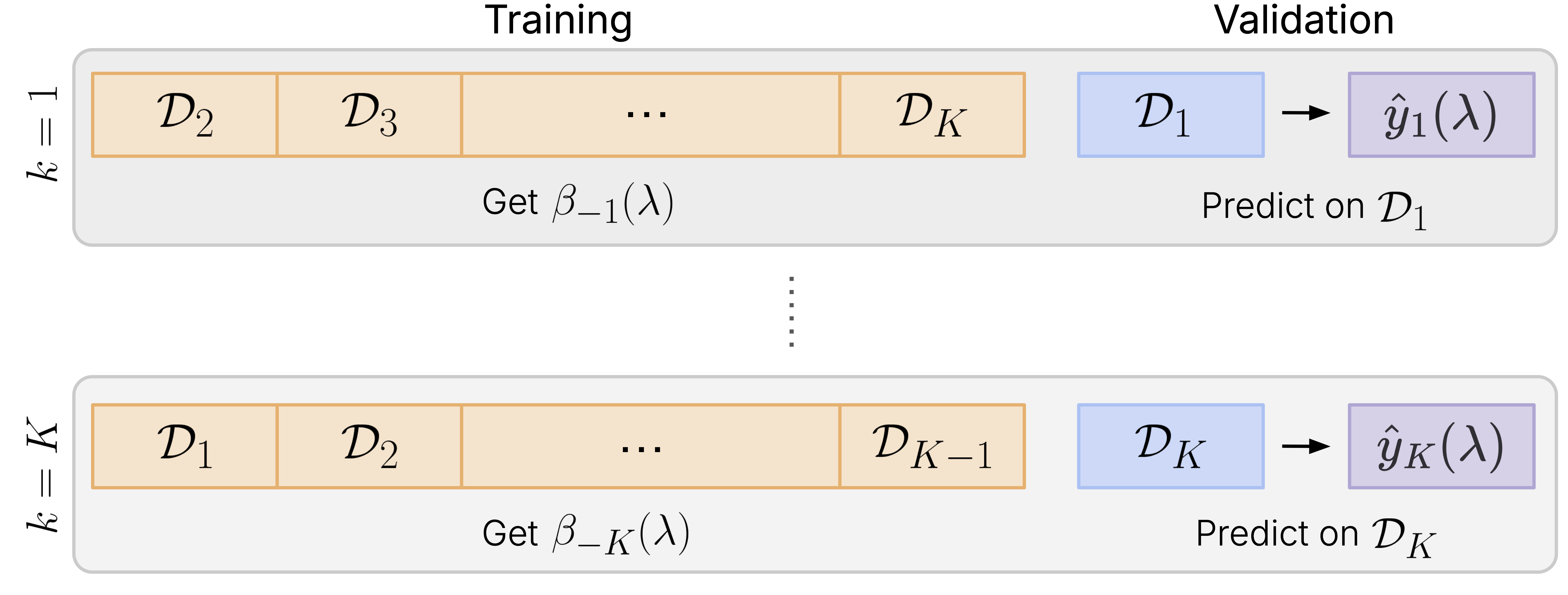
Step 2: Split the data into \(K\) pieces of roughly equal size (called folds).

Step 3: Set \(k=1\). Let \(\mathcal{D}_{-1}\) denote the dataset without the first fold. Fit the model for the entire lambda path on \(\mathcal{D}_{-1}\) to obtain model coefficients \(\beta_{-1}(\lambda)\).

Step 4: Use \(\beta_{-1}(\lambda)\) to get model predictions for the left-out-fold (also known as the validation fold).

Step 5: Repeat Steps 3 and 4 for \(k = 2, \dots, K\), i.e. fit the model on the dataset without the \(k\)th fold, \(\mathcal{D}_{-k}\), to get model coefficients \(\beta_{-k}(\lambda)\), and make predictions on fold \(k\). At the end of Step 5, for each observation \(i\) and \(\lambda\) value, we have an out-of-fold prediction \(\hat{y}_i(\lambda)\). Collectively, these predictions are called the pre-validated fits.
Step 6: Let \(\ell(y, \hat{y})\) denote the loss incurred when predicting \(\hat{y}\) for the true value \(y\). (For instance, when using mean-squared error in ordinary least squares, \(\ell(y, \hat{y}) = (y - \hat{y})^2\).) Use the pre-validated fits to compute the cross-validation error:
\[\widehat{CV}(\lambda) = \frac{1}{n} \sum_{i=1}^n \ell(y_i, \hat{y}_i).\]
The optimal value of \(\lambda\) is the one which gives the smallest \(\widehat{CV}(\lambda)\).
4.1.1 How to choose \(K\)
The number of folds can be as low as two and as high as \(n\), where \(n\) is the number of training data points (this is known as leave-one-out cross-validation, or LOOCV). There are two factors to consider when choosing \(K\), the number of CV folds:
- Time. Let \(\mathcal{D}\) denote the whole training dataset, and let \(\mathcal{D}_{-k}\) denote the dataset without the \(k\)th fold. To run CV for \(K\) folds, you will have to estimate \(K\) models, one for each of the \(\mathcal{D}_{-k}\). The size of the data you are fitting the model for is not much smaller than the original dataset (\(|\mathcal{D}_{-k}| = \frac{K-1}{K}|\mathcal{D}|\)), so \(K\)-fold CV will take approximately \(K\) times as long to run as fitting the original model.
- Bias-variance tradeoff. The larger \(K\) is, the closer \(\mathcal{D}_{-k}\) is to \(\mathcal{D}\), and consequently the model we fit on \(\mathcal{D}_{-k}\) is closer to the model whose performance we want to evaluate (less bias). However, we estimate the model’s performance on a smaller number of data points (the held-out fold), resulting in more variance in the error estimate.
In our extensive simulations, we have found that as \(K\) increases, the bias in CV error decreases significantly, while the variance does not increase much. As such, we recommend using LOOCV in situations where run time is not an issue. For all other cases, we recommend using industry norms \(K=5\) or \(K=10\).
4.2 The cv.glmnet function
The glmnet package has a cv.glmnet function, which is a convenience function that runs CV for the \(\lambda\) hyperparameter. The code snippet below shows how you can call cv.glmnet for a simulated dataset. Note that we set the random seed before calling cv.glmnet. This is recommended because cv.glmnet randomizes the observations into the CV folds; setting the seed will allow you to reproduce results in the future.
cv.glmnet does two things:
- It runs
glmneton the entire dataset. The plots, coefficients and predictions for the returned"cv.glmnet"object are based on this model. - It randomly splits the data into CV folds, then runs CV on these folds. The models fit in this step are not saved: they are only used to compute the CV errors.
The returned object has class "cv.glmnet", and comes equipped with plot, coef and predict methods to understand the fitted models; we elaborate on each of them in the sections following.
By default, cv.glmnet does 10-fold CV and randomly selects which observations go into each fold. We emphasize again the importance of setting the random seed before running cv.glmnet so that results are reproducible. Note that if cv.glmnet is called with the argument keep = TRUE, it will also report which observations were assigned to which folds (more in Section 4.3.1). You can alternatively specify the folds using the foldid argument (see Section 4.3.2).
It is possible for the user to dictate which \(\lambda\) values to run CV on by passing the lambda sequence to cv.glmnet() via the lambda argument. However, we recommend not doing so: by default, cv.glmnet() will use the \(\lambda\) values from Step 1 above, which usually cover the important range of values for most applications. (Like glmnet, cv.glmnet accepts the nlambda and lambda.min.ratio arguments: see Section 3.2.1 for details.)
Note
The “cv.glmnet” object contains statistics that summarize the cross-validated performance of the model. It also contains a component named “glmnet.fit” which is the fit of the model on the entire dataset computed in step 1. above. However, most users will not need to interact directly with this object as the results of the plot, coef and predict methods suffice.
4.2.1 The plot method
The plot method produces a plot of the mean CV error against \(-\log(\lambda)\). The red dots indicate the mean CV error for a given value of \(\lambda\), and the error bars are one standard error above and below the red dot, giving a sense of the variability of the CV error estimates. (We note that the method for obtaining these estimates is crude, and the error bars are generally too small due to correlations across CV folds; see Bates et al. (2023) for more details.)
plot(cvfit)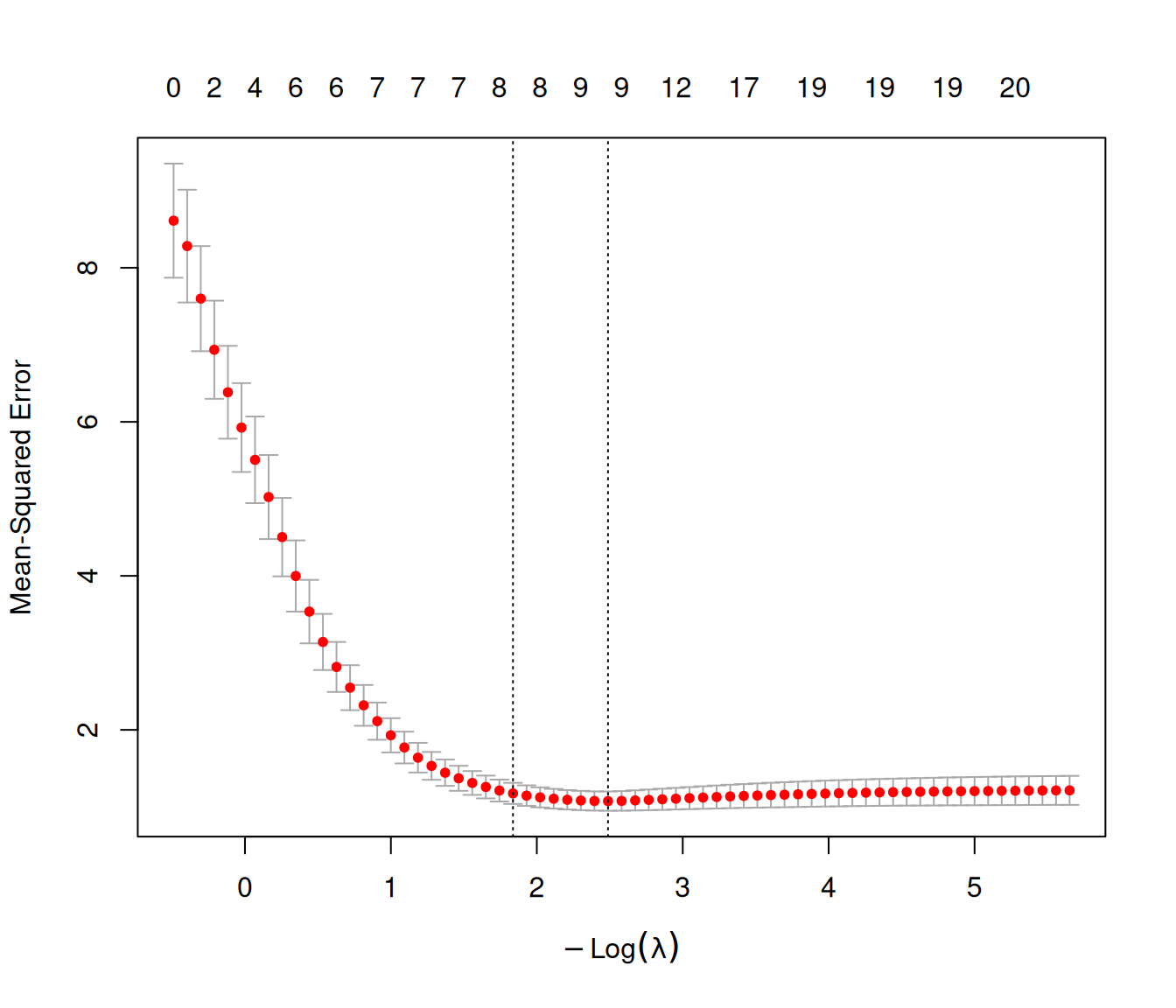
Two special values along the \(\lambda\) sequence are indicated by the vertical dotted lines:
lambda.minis the value of \(\lambda\) that gives the minimum mean CV error,lambda.1seis the value of \(\lambda\) that gives the most regularized model such that the CV error is within one standard error of the minimum.
We can extract these two \(\lambda\) values directly from cv.glmnet’s output as well:
cvfit$lambda.min
#> [1] 0.08307327
cvfit$lambda.1se
#> [1] 0.1593271
If needed, you can extract the CV error estimates and their standard errors from the returned object too (we only show the values for the first five \(\lambda\) values as an example):
cvfit$cvm[1:5]   # CV error estimates (CVM)
#> [1] 8.612159 8.282690 7.600250 6.936160 6.383917
cvfit$cvsd[1:5]  # Standard error (SE) for the error estimates
#> [1] 0.7407538 0.7321367 0.6827655 0.6376419 0.6027383
cvfit$cvlo[1:5]  # CVM - 1SE
#> [1] 7.871405 7.550554 6.917485 6.298518 5.781178
cvfit$cvup[1:5]  # CVM + 1SE
#> [1] 9.352913 9.014827 8.283016 7.573802 6.986655
4.2.2 The “one-standard-error” rule
When selecting the best value of \(\lambda\) in cv.glmnet, we use the “one-standard-error” rule by default, i.e. pick the largest value of \(\lambda\) such that its CV error is within one standard error of the smallest CV error achieved across all \(\lambda\) values. This acknowledges the fact that the risk curves are estimated with error, and so favors greater parsimony. The value of \(\lambda\) which gives the best CV error is denoted by lambda.min, while the \(\lambda\) value given by the “one-standard-error” rule is denoted by lambda.1se.
4.2.3 The coef and predict methods
As with glmnet, the output of cv.glmnet comes with coef and predict methods for giving coefficients and predictions at specific values of \(\lambda\).
coef(cvfit)
#> 21 x 1 sparse Matrix of class "dgCMatrix"
#>             lambda.1se
#> (Intercept)  0.1559184
#> V1           1.2861359
#> V2           .
#> V3           0.6142724
#> V4           .
#> V5          -0.7653592
#> V6           0.4722462
#> V7           .
....
By default, the coef and predict methods return coefficients and predictions for the model at the "lambda.1se" value, i.e. the value of \(\lambda\) that gives the most regularized model such that the CV error is within one standard error of the minimum. To get coefficients or predictions at the \(\lambda\) value which gives the minimum CV error, add the s ="lambda.min" argument to the method call.
predict(cvfit, newx = x[1:5, ], s = "lambda.min")
#>      lambda.min
#> [1,] -1.3647490
#> [2,]  2.5686013
#> [3,]  0.5705879
#> [4,]  1.9682289
#> [5,]  1.4964211
Important
When asked to pick a \(\lambda\) value by CV, glmnet’s default behavior throughout the package is to pick the lambda.1se value. This is different from many other packages which would return the lambda.min value. If you want the model at the \(\lambda\) value with the smallest (estimated) CV error, you must remember to specify the s = "lambda.min" option.
4.3 Parameters for cv.glmnet
4.3.1 The nfolds argument
You can change the number of CV folds by specifying the nfolds argument. For example, the code below does 5-fold CV:
set.seed(1)
cvfit <- cv.glmnet(x, y, nfolds = 5)
To see which fold each observation was assigned to, we have to add keep = TRUE in the original cv.glmnet call. This argument additionally retains the pre-validated predictions as a matrix, with one row for each observation, and one column for each value of \(\lambda\). Below, we show how to access the predictions corresponding to lambda.1se for the first 10 observations.
set.seed(1)
cvfit <- cv.glmnet(x, y, nfolds = 5, keep = TRUE)
cvfit$foldid[1:20]  # fold IDs for the first 20 observations
#>  [1] 3 4 1 4 2 3 4 2 4 1 5 1 4 4 2 3 4 2 3 2

cvfit$fit.preval[1:10, cvfit$lambda == cvfit$lambda.1se]
#>  [1] -1.47966850  2.32637747  0.44674067  1.90710904  1.45014635 -1.12468024
#>  [7]  2.10559503  0.64472550  0.04403329  2.97393228
NoteWhen would I use pre-validated predictions?
As we saw, pre-validated predictions are used for computing the CV error. But they have other uses, too! Suppose we plan to use predictions from glmnet in a downstream model – for example, when we are fitting an ensemble that combines predictions from many models. Using pre-validated predictions to fit the downstream model helps to protect against overfitting.
4.3.2 The foldid argument
In some cases, you may want to explicitly specify which observation goes into which fold. An important use case of this is ensuring consistency of CV folds across multiple runs of cv.glmnet. (An example of this is in Section 4.4, where we want to perform CV for \(\alpha\) in the elastic net penalty.) We can do this with the foldid argument, and here we split the data randomly into 10 folds:
set.seed(2)

foldid <- sample(rep(1:10, 10))
cvfit2 <- cv.glmnet(x, y, foldid = cvfit$foldid)
Another important use case for the foldid argument is when there are multiple observations (rows) associated with individual units in your dataset. In that case, you want to make sure that all the observations belonging to one unit are in the same fold: otherwise, there is information “leakage” between the train-test split for each fold, resulting in over-optimistic error estimates.
We illustrate this with a dataset from Erez et al. (2017). We wish to build a model that predicts a pregnant woman’s probability of having late-onset preeclempsia based on protein abundance data from her plasma samples. There are 1125 input features (each representing the abundance of a particular protein), and the response is 1 if the observation had late-onset preeclempsia, and is 0 otherwise.
library(knitr)
Erez_data <- readRDS("data/Erez.rds")
x <- Erez_data$x
y <- Erez_data$y
kable(head(x[, 1:10]))| SL000318 | SL002662 | SL003168 | SL000403 | SL000591 | SL000053 | SL004332 | SL000592 | SL000584 | SL003322 |
|---|---|---|---|---|---|---|---|---|---|
| 3.214844 | 3.400383 | 3.245315 | 4.775490 | 2.540580 | 2.857152 | 2.392697 | 2.635986 | 3.389308 | 3.644685 |
| 3.346920 | 3.375005 | 3.175802 | 4.801179 | 2.579669 | 2.744371 | 2.352183 | 2.727704 | 3.428151 | 3.763585 |
| 3.044148 | 3.197997 | 3.199097 | 4.793856 | 2.489677 | 2.727623 | 2.322633 | 2.583312 | 3.356255 | 3.729456 |
| 3.174351 | 3.187126 | 3.221179 | 4.802061 | 2.489255 | 2.760799 | 2.393926 | 2.666237 | 3.450926 | 3.754532 |
| 3.120278 | 3.169322 | 3.182586 | 4.780948 | 2.596267 | 2.809156 | 2.343605 | 2.828531 | 3.405517 | 3.792336 |
| 3.366871 | 3.235149 | 3.211521 | 4.753803 | 2.596927 | 2.856185 | 2.356981 | 2.751818 | 3.496736 | 3.585438 |
While the dataset has 666 observations, these observations come from just 166 patients, with each patient having between 2 to 6 observations. The dataset comes with an ID variable that tells us which patient each observation is associated with:
id <- Erez_data$id
id[1:20]  # first 20 values of the ID variable
#>  [1] 1 1 1 1 1 2 2 2 2 2 3 3 3 3 3 4 4 4 4 4
If we simply randomize the observations into folds, we will end up with observations from the same patient being in different folds. To avoid this, we randomize the patients into the folds, then make sure that we tag the observations to the correct folds. The code below shows how to do that1:
n <- max(id)
nfolds <- 10
set.seed(1)
id_cvfold <- sample(rep(seq(nfolds), length = n))
foldid <- id_cvfold[id]

# fold which the first 5 patients belong to
id_cvfold[1:5]
#> [1] 8 9 2 3 4

# fold which the first 20 observations belong to
foldid[1:20]
#>  [1] 8 8 8 8 8 9 9 9 9 9 2 2 2 2 2 3 3 3 3 3

# run cv.glmnet with assigned folds
cvfit_correct <- cv.glmnet(x, y, family = "binomial", foldid = foldid)
(We added family = "binomial" to fit a logistic regression model to handle the binary response: see Chapter 7 for more details.) The code below runs cv.glmnet the incorrect way (simply randomizing observations into folds) and compares the CV error estimates against the correct method for doing CV. We can see that the incorrect way of doing CV results in over-optimistic error estimates, and very different models!
set.seed(2)
cvfit_incorrect <- cv.glmnet(x, y, family = "binomial", nfolds = nfolds)

lambda <- -log(cvfit_correct$lambda)
plot(x = range(lambda), y = range(cvfit_correct$cvm, cvfit_incorrect$cvm), type = "n",
     xlab = expression(-Log(lambda)), ylab = "Binomial Deviance")
points(lambda, cvfit_correct$cvm, pch = 16, col = "blue")
points(lambda, cvfit_incorrect$cvm, pch = 16, col = "red")
lines(lambda, cvfit_correct$cvm, col = "blue")
lines(lambda, cvfit_incorrect$cvm, col = "red")
legend("bottomleft", legend = c("Correct CV", "Incorrect CV"),
       col = c("blue", "red"), pch = 16, lty = 1)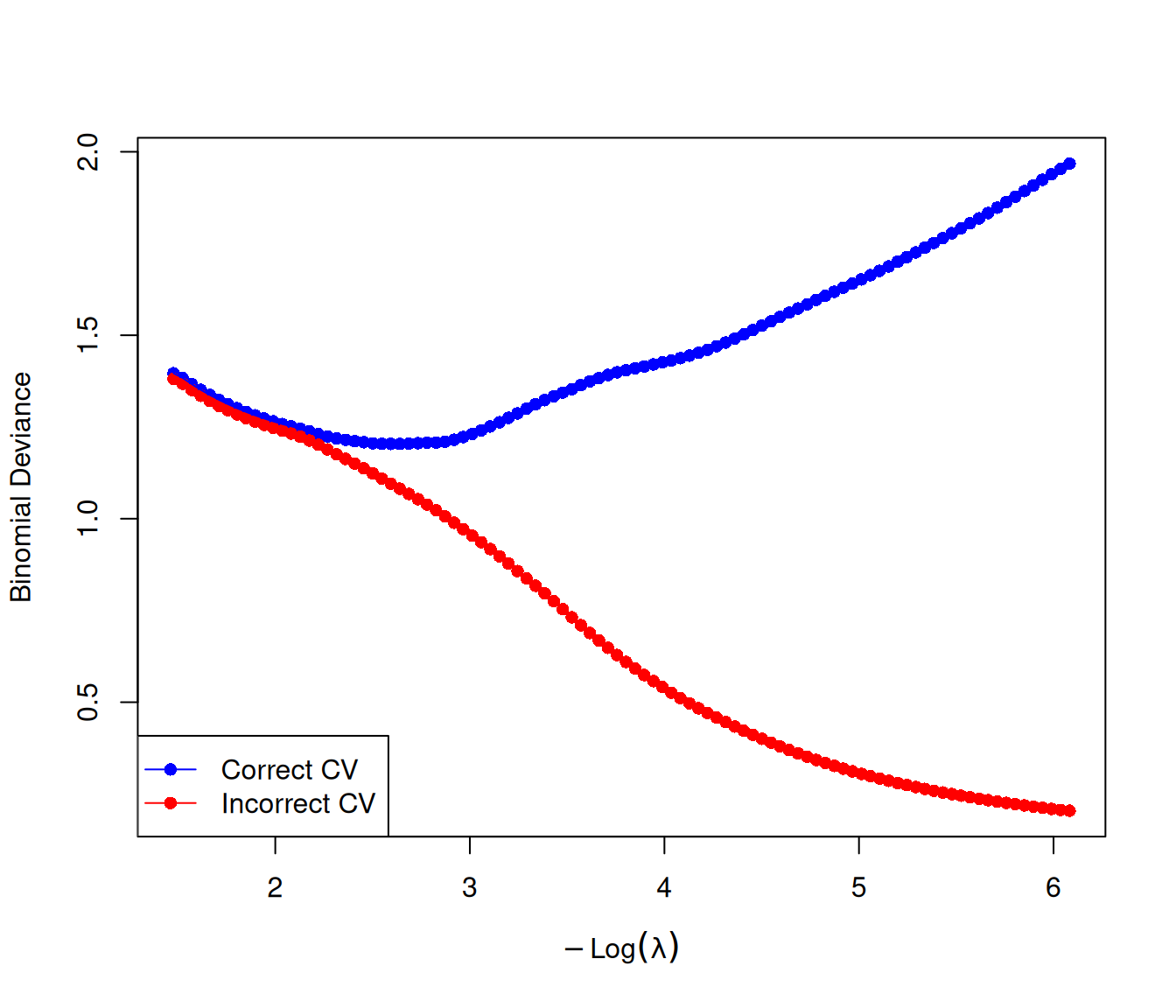
correct.coefs <- coef(cvfit_correct)
incorrect.coefs <- coef(cvfit_incorrect)

plot(x = correct.coefs, y = incorrect.coefs,
     type = "n",
     xlab = "Coefficients using correct CV",
     ylab = "Coefficients using incorrect CV"
)

abline(h = 0, col = "darkgrey", lty = 2)
abline(v = 0, col = "darkgrey", lty = 2)

points(x = correct.coefs, y = incorrect.coefs, pch = 16, col = "darkgreen")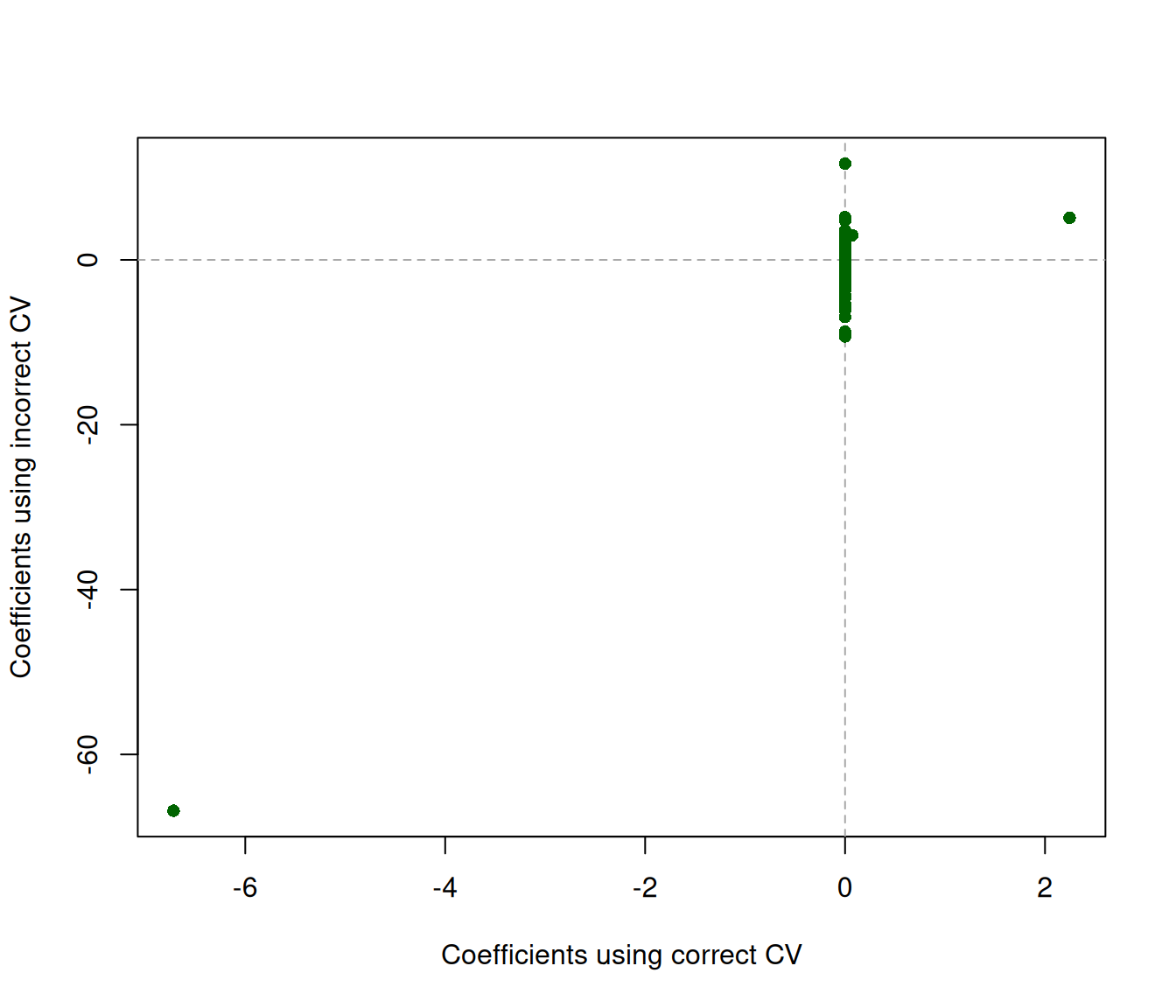
4.3.3 The type.measure argument
The CV error measurement which cv.glmnet can compute depends on the type.measure argument, which in turn depends on the family argument. To see which values type.measure can take on for each family argument, run glmnet.measures() in the console:
glmnet.measures()
#> $gaussian
#> [1] "mse" "mae"
#>
#> $binomial
#> [1] "deviance" "class"    "auc"      "mse"      "mae"
#>
#> $poisson
#> [1] "deviance" "mse"      "mae"
#>
#> $cox
#> [1] "deviance" "C"
#>
#> $multinomial
#> [1] "deviance" "class"    "mse"      "mae"
#>
#> $mgaussian
#> [1] "mse" "mae"
#>
#> $GLM
#> [1] "deviance" "mse"      "mae"
For example, we see that for family="binomial" (Chapter 7), type.measure can be one of c("deviance", "class", "auc", "mse", "mae"). Below is an example of running cv.glmnet to return estimates of misclassification error for different values of the \(\lambda\) penalty parameter:
set.seed(1)
cvfit <- cv.glmnet(x, y, family = "binomial", foldid = foldid,
                   type.measure = "class")
plot(cvfit)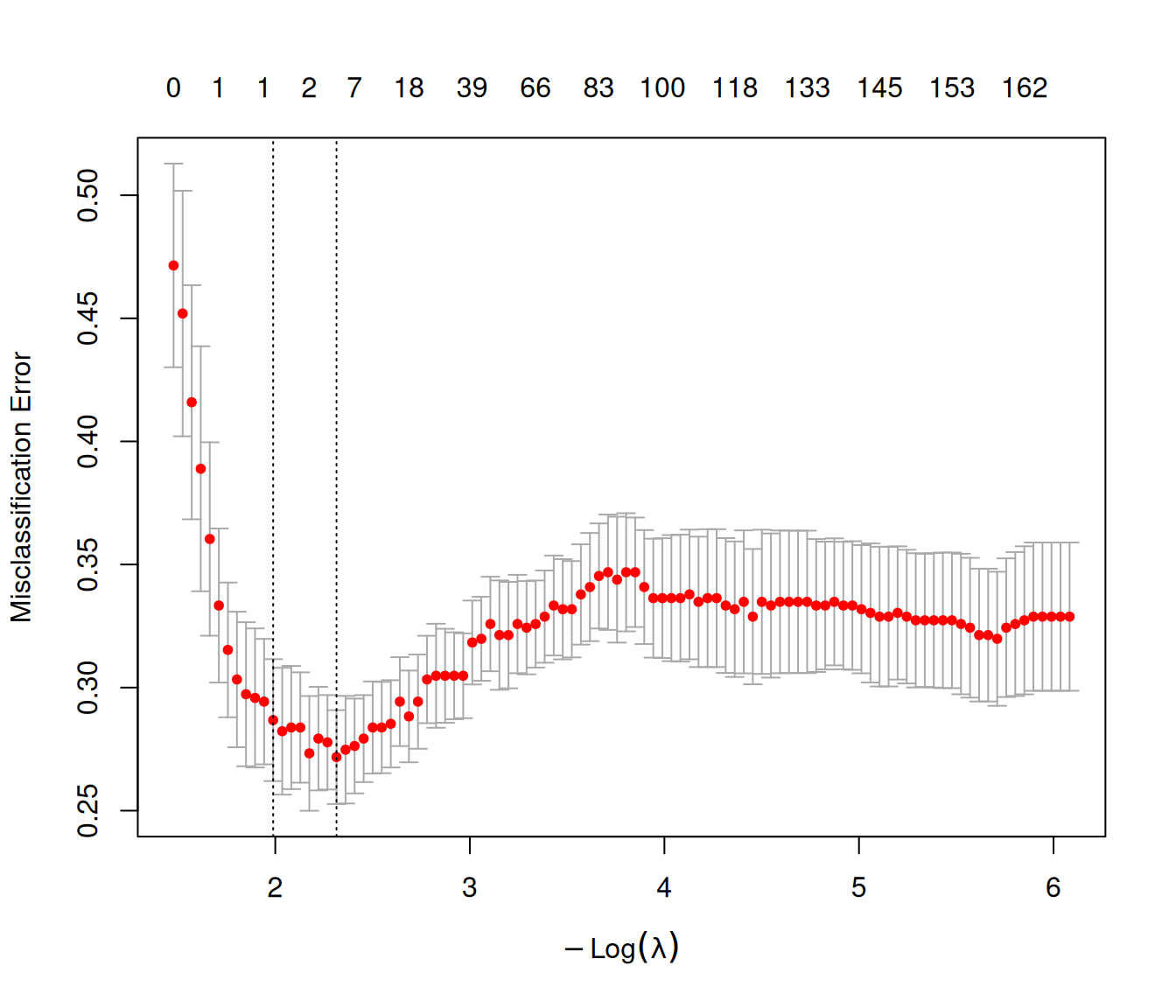
4.4 Using cv.glmnet to choose \(\alpha\)
In general, we prefer to think of \(\alpha\) in the elastic net penalty2 as a higher-level hyperparameter that we set taking into account the nature of the data and the extent of the correlation between the features. Nevertheless, the code below shows how you can perform CV for \(\alpha\) manually using a for loop and extract the value of \(\alpha\) giving the smallest CV error. (Care must be taken to ensure that the same CV folds are used across runs for the CV errors to be comparable.)
Note
Note: the estimated CV error for \(\alpha\) will be optimistic, since we are selecting the value that minimizes the cross-validation error computed on the training data. This effect is amplified because, for each \(\alpha\), we are also selecting the optimal \(\lambda\) — making the final \((\alpha, \lambda)\) choice highly tuned to the training data.
alphas <- c(1, 0.8, 0.5, 0.2, 0)
fits <- list()
set.seed(1)
fits[[1]] <- cv.glmnet(x, y, keep = TRUE)
foldid <- fits[[1]]$foldid
for (i in 2:length(alphas)) {
  fits[[i]] <- cv.glmnet(x, y, alpha = alphas[i], foldid = foldid)
}

# extract CV error corresponding to the best lambda for each alpha
best_cvm <- sapply(fits, function(fit) min(fit$cvm))
barplot(height = best_cvm, names.arg = alphas, xlab = "alpha", ylab = "CV error")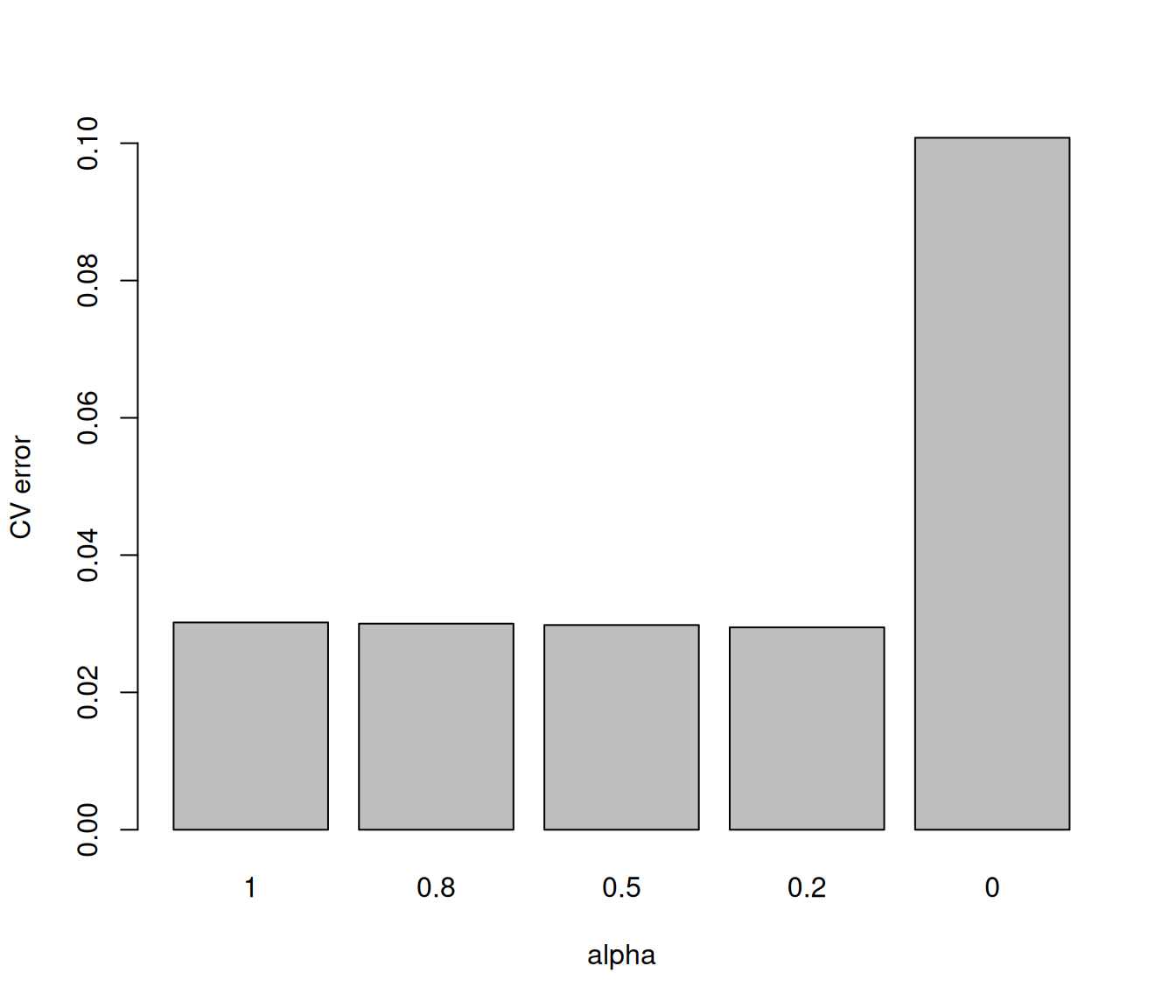
4.5 CV with parallel computing
For cv.glmnet, it is possible to run the computation for each of the CV folds in parallel. We do this with the parallel argument. Note that a parallel backend (e.g. doMC) must be set up first before cv.glmnet can perform parallel computation.
The code below compares the timings3 for running cv.glmnet with 10 folds with and without parallelization. There is some speed-up, but perhaps not as much as one might expect because of (i) the overhead in setting up parallel computation, and (ii) fitting the glmnet model for the entire dataset is not parallelized.
# set up parallel backend
library(doMC)
registerDoMC(cores = 4)

set.seed(1)
n <- 1e5; p <- 200
x <- matrix(rnorm(n * p), n, p)
y <- rnorm(n)
system.time(cv.glmnet(x, y))  # without parallelization
#>    user  system elapsed
#>   4.820   0.497   5.340
system.time(cv.glmnet(x, y, parallel = TRUE))  # with parallelization
#>    user  system elapsed
#>   8.378   1.241   3.816
Increasingly popular is the choice nfolds = n (leave-one-out or LOO), since this choice makes the training fold of size n-1, almost the same size as the original sample. There is also no randomness due to fold selection. We rerun our experiment with nfolds=n, but with a more modest value of n=1000.
set.seed(1)
n <- 1e3; p <- 200
x <- matrix(rnorm(n * p), n, p)
y <- rnorm(n)
system.time(cv.glmnet(x, y, nfolds = n, grouped = FALSE))  # without parallelization
#>    user  system elapsed
#>   8.994   0.144   9.138
system.time(cv.glmnet(x, y, nfolds = n, parallel = TRUE, grouped = FALSE))  # with parallelization
#>    user  system elapsed
#>    9.177   0.399   3.16
The speed up is almost a factor of 3 using 4 cores.
This code assumes that the patient IDs are consecutive positive integers going from 1 to the number of patients in the dataset. If your ID variable is not coded as such, you will need to convert your ID variable to this setting first.↩︎
Recall that the elastic net penalty is \(\lambda\left( \frac{1-\alpha}{2}\|\beta\|_2^2 + \alpha \| \beta\|_1 \right)\).↩︎
The relevant timing numbers to compare here are the
elapsednumbers as it roughly represents wall-clock time, or time that has actually elapsed since the process was started. (userandsystemtimes refer to the total user and system CPU times of the current R process and any child processes on which it has waited.)↩︎