library(knitr)
library(fsemipar)
#> Loading required package: grpreg
data("Tecator")

y <- cbind(Tecator$fat, Tecator$protein, Tecator$moisture)
x <- cbind(Tecator$absor.spectra, Tecator$absor.spectra1, Tecator$absor.spectra2)

# no. of observations x no. of input features
dim(x)
#> [1] 215 300

# no. of observations x no. of output features
dim(y)
#> [1] 215 311 Multi-task learning
11.1 Introduction to multi-task learning (MTL)
In traditional machine learning, prediction models are trained to predict a single outcome. However, many real-world prediction problems involve multiple related prediction tasks which can benefit from shared knowledge. Multi-task learning (MTL) is a paradigm where a single model is trained to simultaneously predict well on multiple outcomes (“tasks”), leveraging commonalities across tasks to improve overall performance.
MTL is particularly useful when tasks share some underlying structure and factors. By learning from multiple tasks at once, MTL reduces the risk of overfitting for any single response variable, especially when dealing with limited training data.
Here are some examples where MTL could be useful:
In genetics, we may have a dataset of genetic expression levels which we want to use to predict propensity for multiple related diseases.
In neuroimaging, we may have a set brain imaging features (e.g., fMRI voxel intensities) which we want to use to predict a variety of cognitive test scores.
In finance, we may have a various economic indicators and macroeconomic features which we want to use to predict the price of multiple related assets (e.g. equities in the same industry).
In neuroimaging, we may have a set of brain imaging features (e.g., fMRI voxel intensities) which we want to use to predict a variety of cognitive test scores.
In finance, we may have various economic indicators and macroeconomic features which we want to use to predict the price of multiple related assets (e.g. equities in the same industry).
In sales forecasting, we may have inputs like marketing spend and seasonal and/or economic indicators to predict sales volumes for multiple products. These products are often affected by the same factors (e.g. seasonality, company-wide advertisting campaign), and so learning across responses can improve model performance.
11.2 Notation for the MTL setup
Let’s look at the simple setup where we have \(K\) response variables and we want to fit an ordinary least squares (OLS) model for each response. In the OLS setup for a single response variable, our model was
\[y = \beta_0 + \mathbf{x}^\top \beta,\]
where \(\mathbf{x} = \begin{pmatrix} x_1 & \dots & x_p \end{pmatrix}^\top\) and \(\beta = \begin{pmatrix} \beta_1 & \dots & \beta_p \end{pmatrix}^\top\). In the MTL setup, we have \(K\) response variables denoted by \(y^{(1)}, \dots, y^{(K)}\). The model for the \(k\)th response variable is
\[y^{(k)} = \beta_0^{(k)} + \mathbf{x}^\top \beta^{(k)},\]
where \(\beta_0^{(k)} \in \mathbb{R}\) is the intercept term for the \(k\)th model and \(\beta^{(k)} \in \mathbb{R}^p\) is the coefficient vector for the \(k\)th model. Notice that the input variables \(\mathbf{x}\) are the same across all \(K\) models. We are trying to predict each of the responses with the same features, but we allow the different coefficients for each response model to vary the relationship between the features and response.
As with the OLS setup, it’s possible to write the \(K\) models more succinctly in matrix notation. Writing the responses \(\mathbf{y} = \begin{pmatrix} y^{(1)} & \dots & y^{(K)} \end{pmatrix}\) and intercepts \(\mathbf{b}_0 = \begin{pmatrix} \beta_0^{(1)} & \dots & \beta_0^{(K)} \end{pmatrix}\) as row vectors and the coefficients \(\mathbf{B} = \begin{pmatrix} \beta^{(1)} & \dots & \beta^{(K)} \end{pmatrix} \in \mathbb{R}^{p \times K}\) as a matrix, we can condense all \(K\) models into a single line:
\[\mathbf{y} = \mathbf{b}_0 + \mathbf{x}^\top \mathbf{B}. \tag{11.1}\]
11.3 Direct application of OLS doesn’t work
Recall that in OLS, we estimated the parameters \((\beta_0, \beta)\) by minimizing the residual sum of squares (RSS). A naïve approach to estimating the parameters \((\mathbf{b}_0, \mathbf{B})\) in Equation 11.1 would be to minimize the sum of the RSS across the \(K\) models. Assume that we have \(n\) observations and that for each observation \(i\), we observe input features \(\mathbf{x}_i = \begin{pmatrix} x_{i1}, \dots, x_{ip} \end{pmatrix}^\top\) and responses \(y_i^{(1)}, \dots, y_i^{(K)}\). Let’s look carefully at the quantity we want to minimize:
\[\left[ \sum_{i=1}^n \left( y_i^{(1)} - \left( \beta_0^{(1)} + \mathbf{x}_i^\top \beta^{(1)} \right) \right)^2 \right] + \dots + \left[ \sum_{i=1}^n \left( y_i^{(K)} - \left( \beta_0^{(K)} + \mathbf{x}_i^\top \beta^{(K)} \right) \right)^2 \right].\]
Notice that the minimization problem can be decoupled into \(K\) separate minimization problems! The \(k\)th minimization problem is minimizing the RSS for the \(k\)th response and involves only \((\beta_0^{(k)}, \beta^{(k)})\) and no other parameters. The implication is that the coefficients we obtain from joint minimization are exactly the same as those we would have obtained by fitting \(K\) separate OLS models: there is no information sharing across response models!
11.4 Regularizing the multi-task Gaussian model
We can enable learning across tasks by adding an appropriate penalty to the minimization problem. Instead of minimizing just the sum of the RSS across the responses, we add a vectorized version of the elastic net penalty to the objective function:
\[(\hat{\mathbf{b}}_0, \hat{\mathbf{B}}) = \underset{(\mathbf{b}_0, \mathbf{B})}{\text{argmin}} \; \frac{1}{2n} \sum_{k=1}^K \sum_{i=1}^n \left[ y_i^{(k)} - \left( \beta_0^{(k)} + \mathbf{x}_i^\top \beta^{(k)} \right) \right]^2 + \lambda\ \sum_{j=1}^p \left[ \frac{1-\alpha}{2} \| \beta_j \|_2^2 + \alpha \| \beta_j \|_2 \right].\]
Here \(\beta_j\) is a vector of \(K\) coefficients, one for each class: \(\beta_j = [\beta_j^{(1)},\beta_j^{(2)},\ldots,\beta_j^{(K)}]^\top\). In the second term within the penalty, we replaced the absolute value penalty on each single coefficient with a group lasso penalty (Yuan and Lin 2005) on each model coefficient vector \(\beta_j\).
The group lasso penalty behaves like the lasso, but on the whole group of coefficients for each variable: the elements of \(\beta_j\) are either all zero, or else none are zero, but are shrunk by an amount depending on \(\lambda\). As a result, an input variable is either included in the model for all the responses, or excluded for all the responses. \[ (\hat{\mathbf{b}}_0, \hat{\mathbf{B}}) = \underset{(\mathbf{b}_0, \mathbf{B})}{\text{argmin}} \quad \frac{1}{2n} \sum_{k=1}^{K} \sum_{i=1}^{n} \left[ y_i^{(k)} - \left( \beta_0^{(k)} + \mathbf{x}_i^\top \beta^{(k)} \right) \right]^2 + \lambda \sum_{j=1}^{p} \left[ \frac{1-\alpha}{2} \left\| \beta_{j\cdot} \right\|_2^2 + \alpha \left\| \beta_{j\cdot} \right\|_2 \right], \tag{11.2}\]
where \(\beta_{j\cdot} = \big( \beta_j^{(1)}, \dots, \beta_j^{(K)} \big)\) is the \(j\)-th row of the coefficient matrix \(\mathbf{B}\): variable \(j\)’s coefficients across the \(K\) responses.
In the second term within the penalty, we replaced the absolute penalty on each single coefficient with a group lasso penalty (Yuan and Lin 2005) on each variable’s coefficient vector \(\beta_{j\cdot}\).
The group lasso penalty behaves like the lasso, but on the whole group of coefficients for each variable: the elements of \(\beta_{j\cdot}\) are either all zero, or else none are zero, but are shrunk by an amount depending on \(\lambda\). As a result, an input variable is either included in the models for all the responses, or excluded for all the responses.
Such a model is easy to fit with the glmnet package: we simply have to call the glmnet function with family = "mgaussian". We show an example below using the Tecator dataset (Borggaard and Thodberg 1992) from the fsemipar package. This dataset includes near-infrared absorbance spectra of finely chopped meat samples (input features \(x\)) and corresponding measurements of moisture, fat, and protein content (multi-response \(y\)).
# fit the model with glmnet
mfit <- glmnet(x, y, family = "mgaussian")
Many of the arguments for the default family = "gaussian" apply to family = "mgaussian" as well: we only focus on the differences below.
11.5 The coef method
When we called the coef method for single-response models, the returned object was a sparse matrix of coefficients, one column for each lambda value (the entire lambda path for glmnet, the specified lambda values for cv.glmnet). The coef method for multi-response models returns a list, with each element of the list being a sparse matrix of coefficients for each response.
The code below fits the model with cross-validation and extracts model coefficients at the s = "lambda.min" value.
set.seed(1)
mcvfit <- cv.glmnet(x, y, family = "mgaussian")
coefs <- coef(mcvfit, s = "lambda.min")
The code below plots a heatmap of the model coefficients (due to size constraints we only show the model coefficients for features 201-300). Notice the sparsity pattern induced by the group lasso penalty: for each feature, its coefficient is either zero across all the models or non-zero across all the models.
# Convert list of sparse matrices (excluding intercept) to dense matrix and combine
coef_mat <- do.call(cbind, lapply(coefs, function(m) as.vector(m)[-1]))
colnames(coef_mat) <- names(coefs)

# Use tidyr and ggplot2 to make coefficient heatmap
# We only plot for features 201-300
library(tidyverse)
coef_mat_reduced <- coef_mat[201:300,]
coef_df <- as.data.frame(coef_mat_reduced) %>%
  mutate(Feature = paste0("x", 1:nrow(coef_mat_reduced))) %>%
  pivot_longer(
    cols = -Feature,
    names_to = "Response",
    values_to = "Coefficient"
  )

ggplot(coef_df, aes(x = Response, y = Feature, fill = Coefficient)) +
  geom_tile(color = "black", linewidth = 0.05) +
  scale_fill_gradient2(low = "blue", mid = "white", high = "red", midpoint = 0) +
  coord_fixed(ratio = 0.03) +
  labs(title = "Coefficient Heatmap at s = \"lambda.min\"",
       x = "Response", y = "Feature") +
  theme(axis.text.y = element_blank())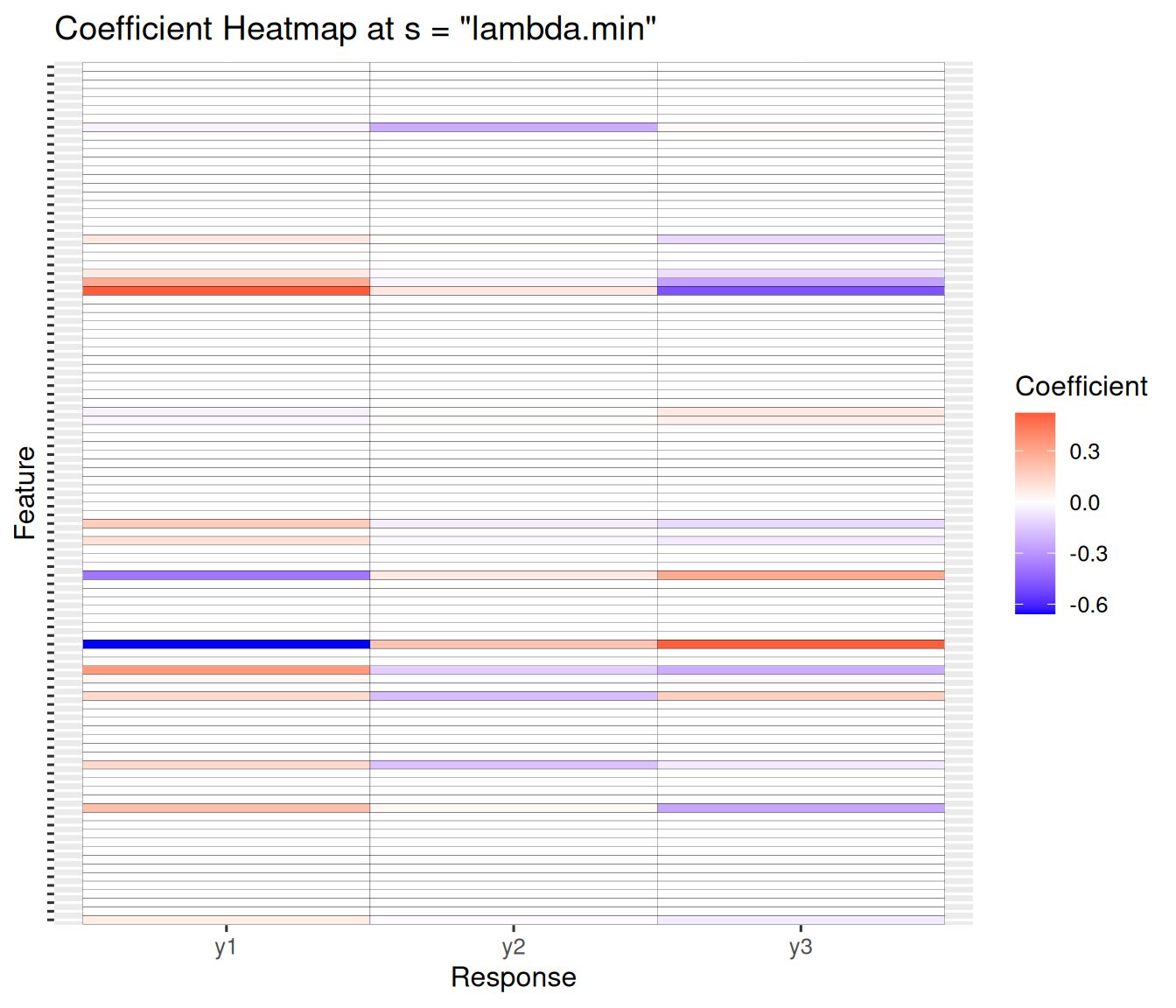
11.5.1 The plot method
The default plot method gives one coefficient plot for each response:
par(mfrow = c(2, 2))
plot(mfit, xvar = "lambda")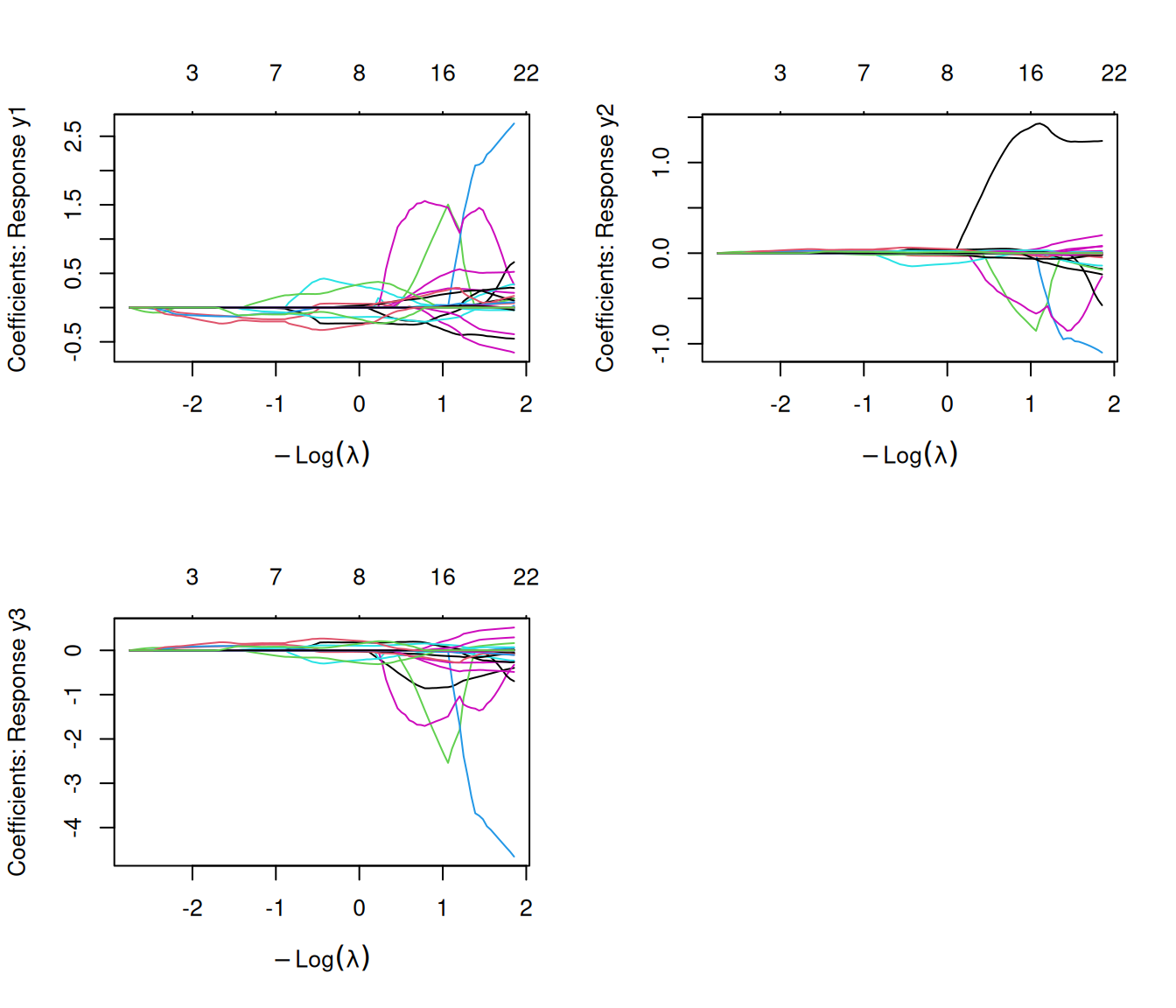
We can set type.coef = "2norm": under this setting, a single curve is plotted per variable, with value equal to the \(\ell_2\) norm of the variable’s coefficient vector.
plot(mfit, xvar = "lambda", type.coef = "2norm")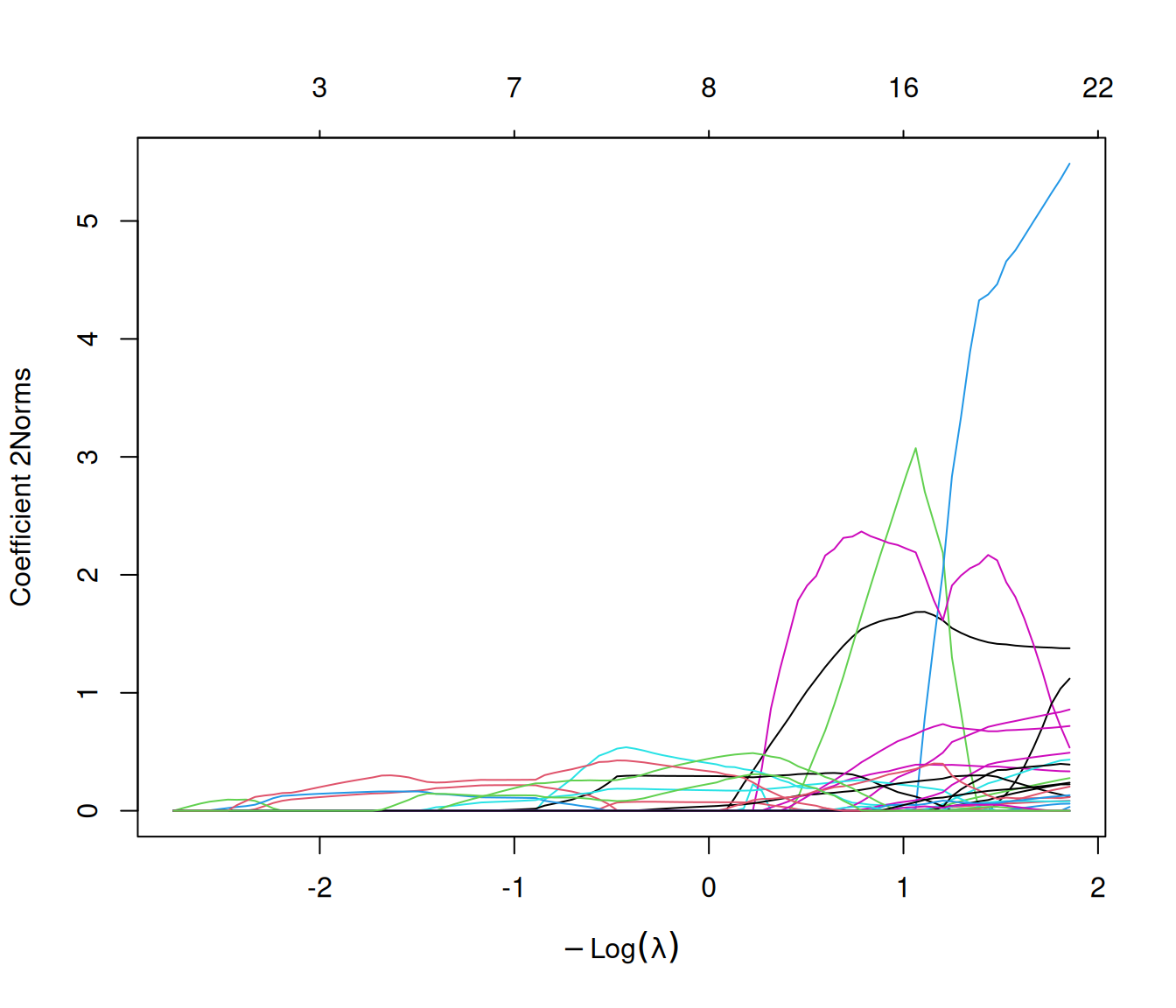
11.5.2 The predict method
The predict method works in the same way for family = "mgaussian" as with other families, but the predictions are returned in a three-dimensional array. The first two dimensions form the prediction matrix (observations × responses); the third indexes the \(\lambda\) values.
In the example below, the returned object has dimension \(3 \times 3 \times 2\): 3 for the number of observations we want predictions for, 3 for the number of response variables, and 2 for the number of \(\lambda\) values we want predictions at.
predict(mfit, newx = x[1:3,], s = c(0.1, 0.01))
#> , , s=0.10
#>
#>            y1       y2       y3
#> [1,] 19.05837 16.85894 62.98875
#> [2,] 36.54393 14.80920 48.46487
#> [3,] 10.23864 20.09123 69.76196
#>
#> , , s=0.01
#>
#>            y1       y2       y3
#> [1,] 19.05837 16.85894 62.98875
#> [2,] 36.54393 14.80920 48.46487
#> [3,] 10.23864 20.09123 69.76196
11.5.3 The standardize.response option
As explained in Chapter 5, for family = "gaussian", the response variable is automatically standardized. This is not the case for family = "mgaussian": by default, the response variables are used as-is. If you want to standardize the response variables before fitting the model, pass standardize.response = TRUE into the glmnet call, like below:
mfit <- glmnet(x, y, family = "mgaussian", standardize.response = TRUE)Why this argument? As we saw above, for each variable there is a vector of coefficients \(\beta_j\), one for each response. These will reflect the scale of the different responses, and hence the way the penalty \(\|\beta_j\|_2\) weighs their different contributions. The returned coefficients are always on the original scale of the response variables, no matter the value of the standardize.response option.